
Disclaimer: This review isn’t based on a quick demo. We spent months managing Phonexa for one of our client, dealing with it daily. What we’re sharing is our raw, unfiltered experience. If we sound critical, it’s not to bash the competition. It’s the honest perspective of someone who had to actually make the system work.
What is Phonexa?
Phonexa is an old, US-based platform that started with a call tracking and grew over last decade when there were few alternatives. Today, however, it feels outdated. While it performs well for call tracking, its affiliate marketing and lead generation features play a secondary role. The platform feels like a collection of modules bolted together later without a plan. Because of this, the modules don’t truly work together even though some features are powerful.
For example, you can Approve/Reject affiliate transactions in Lynx (for link traffic), but not in LMS Sync (for lead traffic). While Phonexa offers many features, it is unnecessarily complex, outdated, expensive and difficult to adapt to the needs of modern businesses.
Below, we explore Phonexa’s features and key limitations in detail and compare them directly to our PalDock. For businesses that rely on lead distribution or affiliate tracking, these gaps often become a major bottleneck. We built PalDock as a purpose-built alternative to solve these exact problems.
One platform. All the tools.
From tracking to payouts – Paldock replaces the mess.
Pros and Cons of Phonexa
Pros:
+ Solid call tracking with granular detail
+ Can do call tracking, affiliate link tracking and lead generation tracking in one tool
+ Possibility to integrate a lot of advertiser’s API, but with limited features
+ Affiliates can use both the API and embedded forms
+ Responsive support
Cons:
– Affiliate and leadgen features feel like afterthoughts
– Overcomplicated UX where affiliates get lost easily and even simple tasks require too many steps and time
– Limited customization and localization (only English language and USD/GBP currency)
– Fragmented logic with separate modules for links and leads and no unified conversion view
– Lead generation module does not support Pending conversion status or Pending payouts (everything becomes invoiceable immediately)
– Cannot combine pixel tracking and S2S postback tracking, you have to pick one which is problematic because their pixel tracking is flawed, as explained below.
-No support for first-party pixel tracking, leading to a 50% drop in measured affiliate traffic for one of our clients’ affiliate programs
– Horrible documentation and knowledge base that is hard to navigate
Affiliate Experience That Belong in a Museum
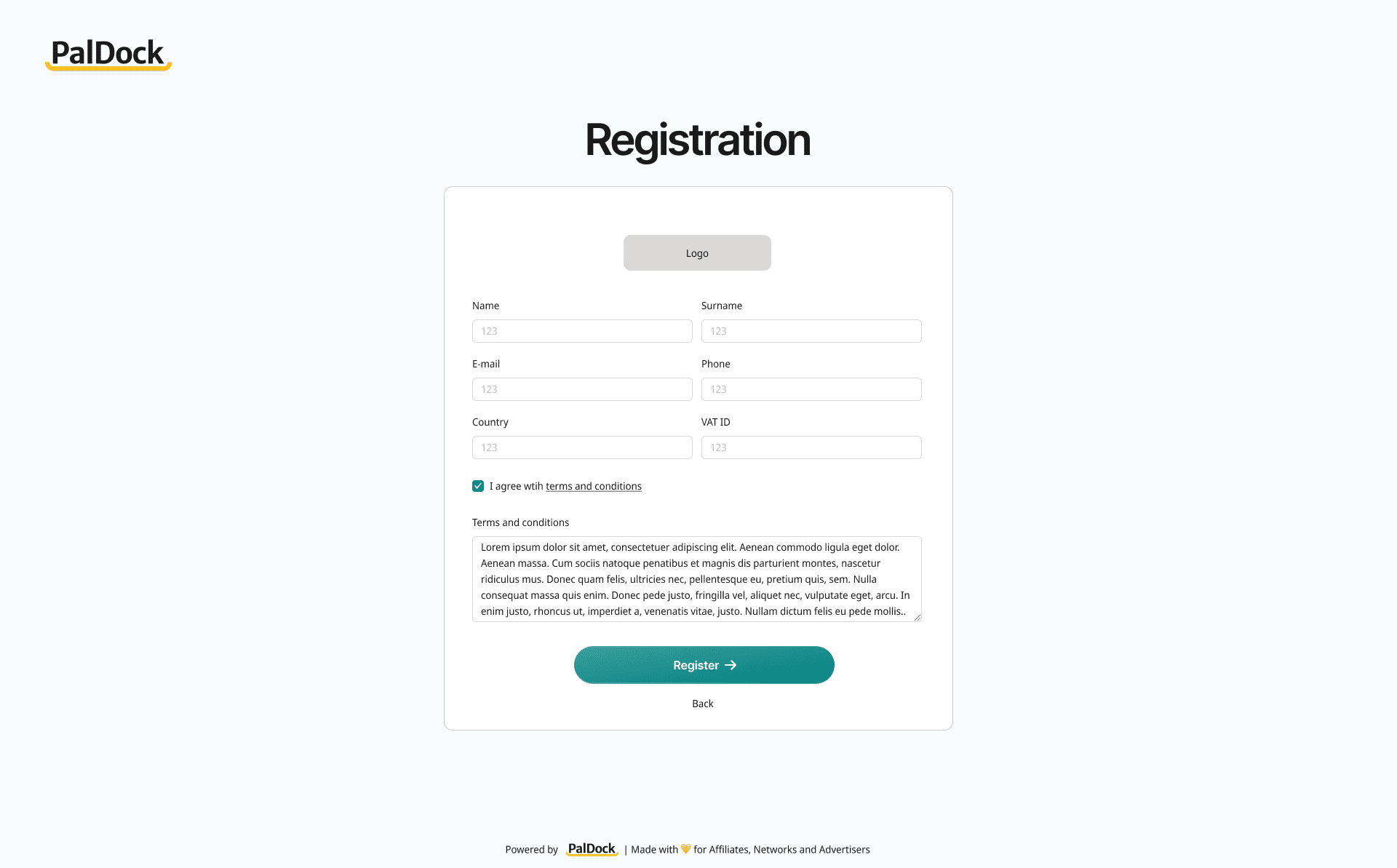
The affiliate registration form feels outdated, and every default value is set to the US, even if your offer is not based there. These settings can’t be changed, so affiliates are forced to scroll through a list of 250 countries and phone prefixes just to complete the form. The worst part is that you cannot customize the form fields or even add a simple ‘I agree with the Terms and Conditions’ checkbox. See for yourself below and compare Phonexa to the best alternative: PalDock, where you can fully customize your forms exactly how you need.

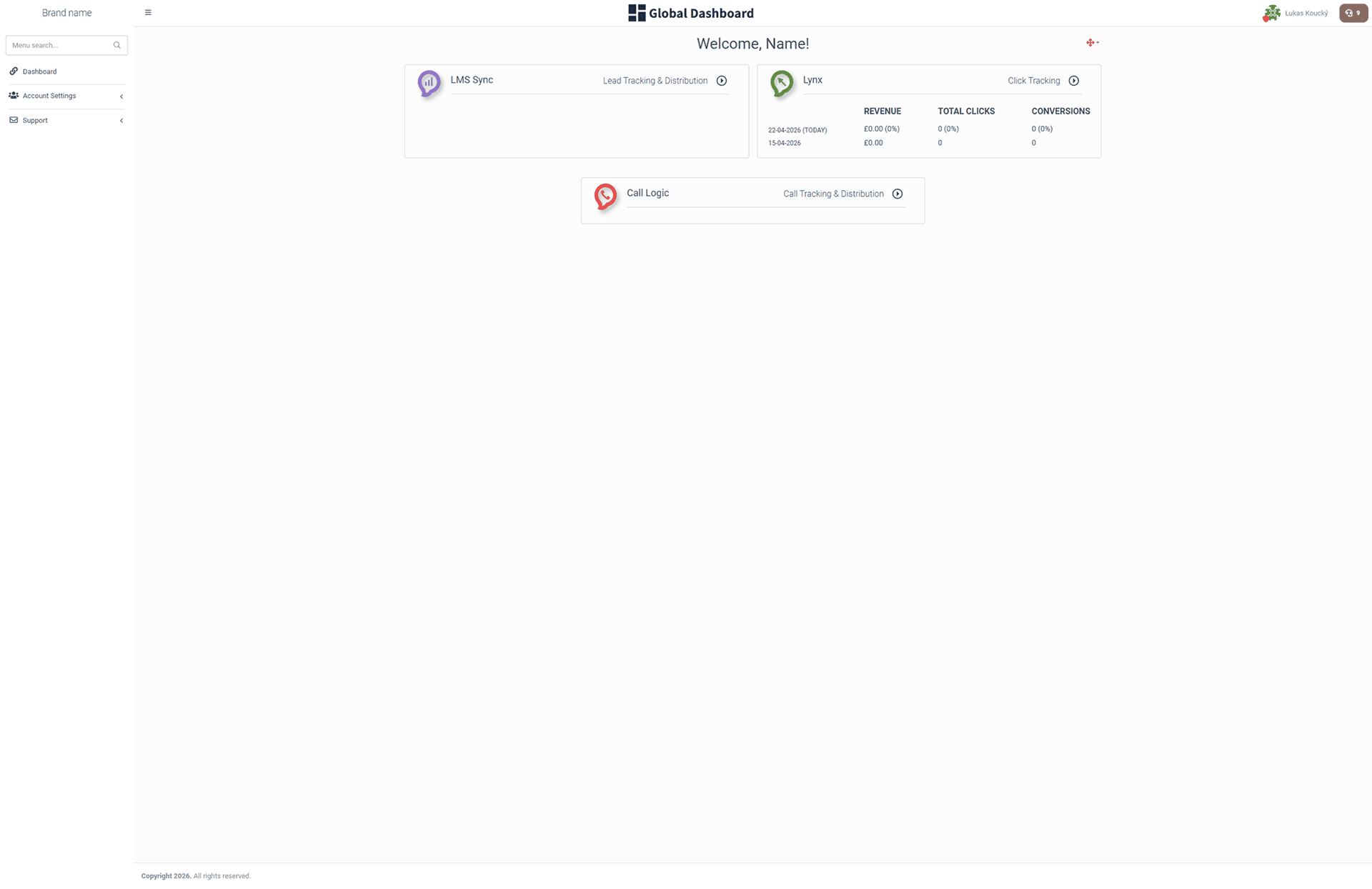
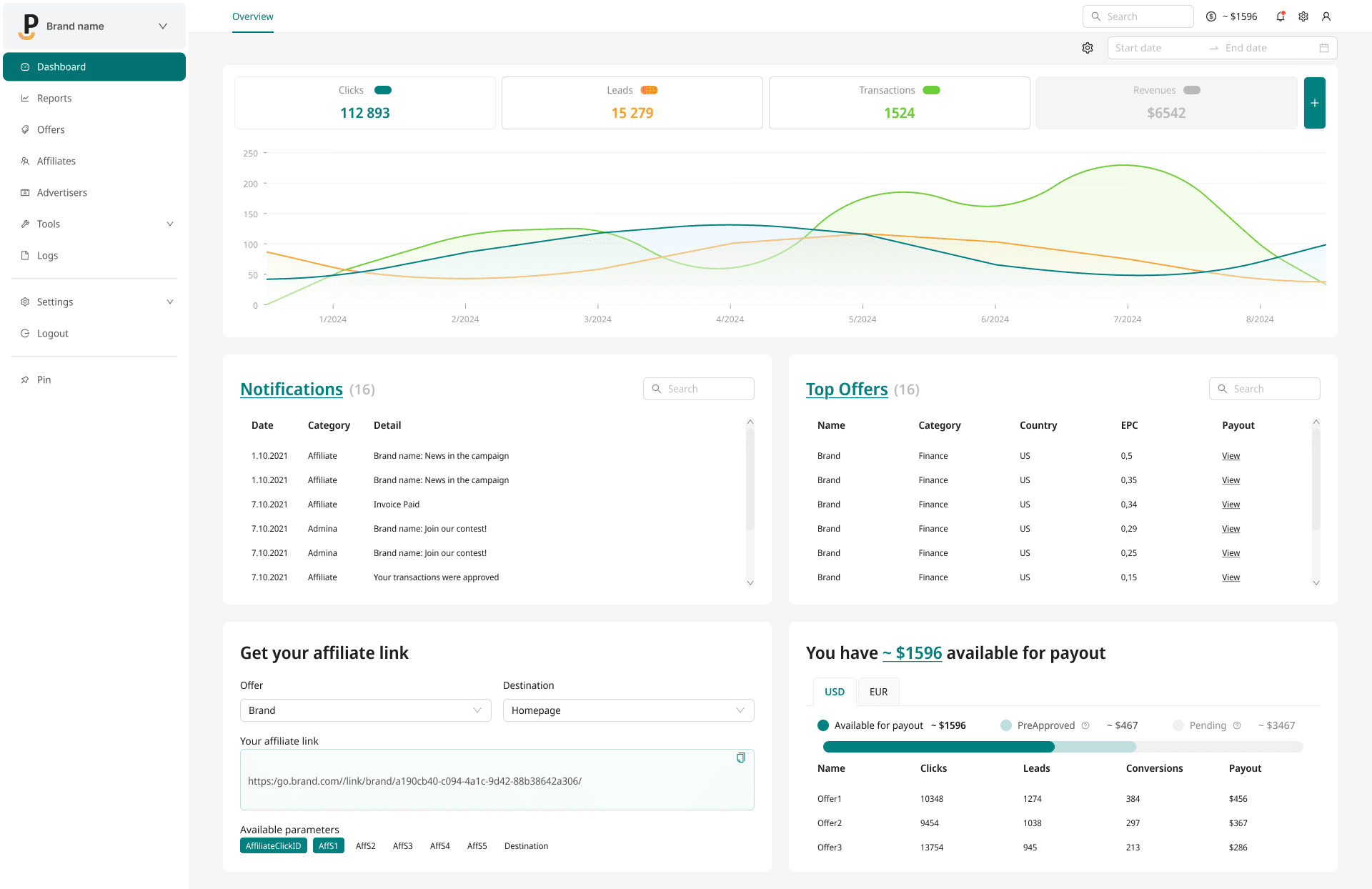
Another issue is the login experience. When affiliates log in, they land on a “dashboard” showing modules like Lynx and LMS Sync – terms most have never heard of. It’s again, not customizable. Since these modules are independent, many things work completely differently inside, which confuses both affiliates and even admins. So instead of a clean dashboard, users are greeted with a mess.
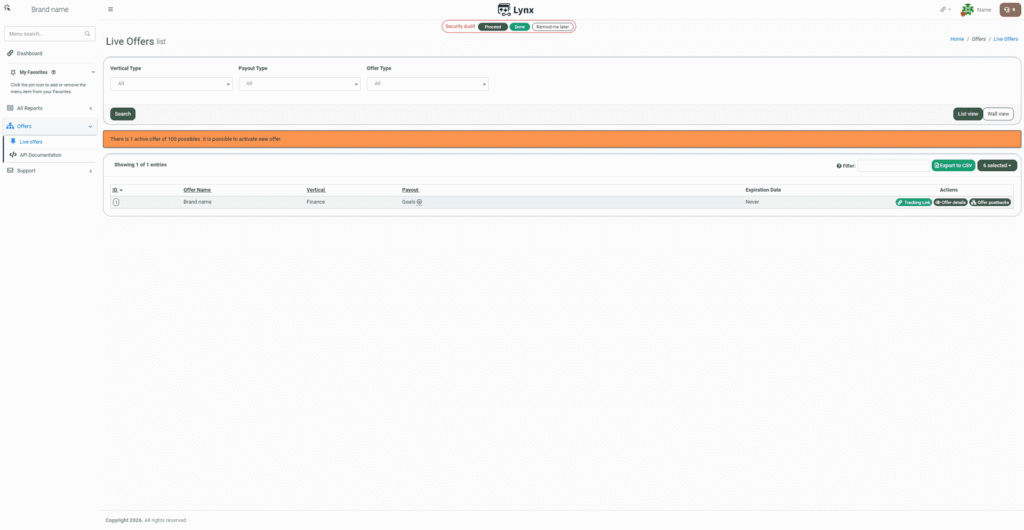
List of offers is fine
The list of offers, on the other hand, is decent and provides all the necessary information. Setting aside the fact that admin-only alerts (like ‘maximum 100 offers’) are visible to affiliates.
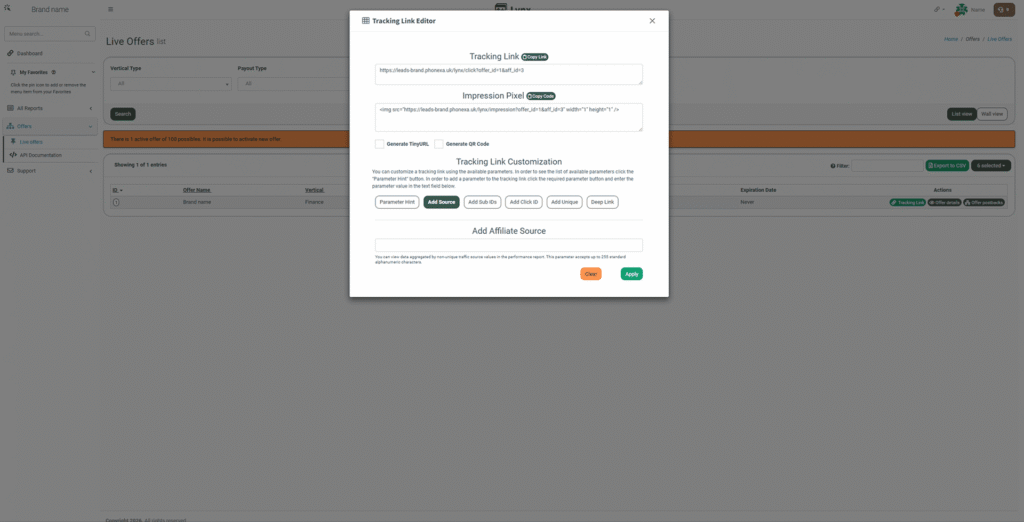
The good thing is that affiliates can generate their unique tracking links with a single click directly from the listing. It fully supports custom parameters and deep links. This part works exactly as it should.
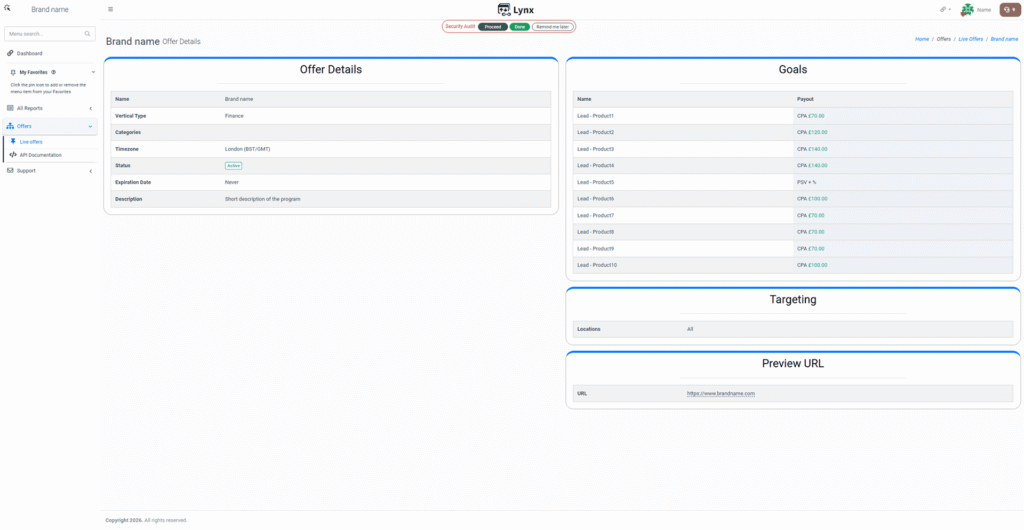
Offer details do not have enough… details
Things get worse once you click into an individual offer. Affiliates are stuck with a generic, auto-generated table that admins can’t customize. It completely lacks detailed descriptions, media assets, and promotion rules – the exact information affiliates need to start.
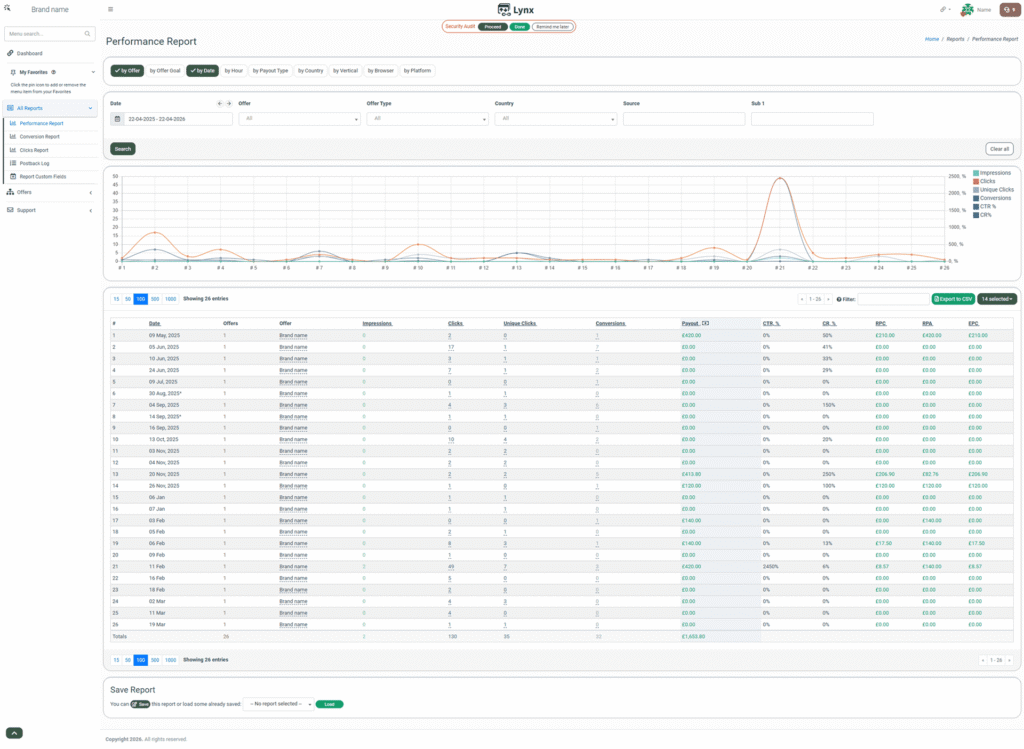
Once an affiliate starts running traffic, they will want to track their performance. Phonexa handles this well, offering a variety of reporting options and a detailed conversion breakdown.
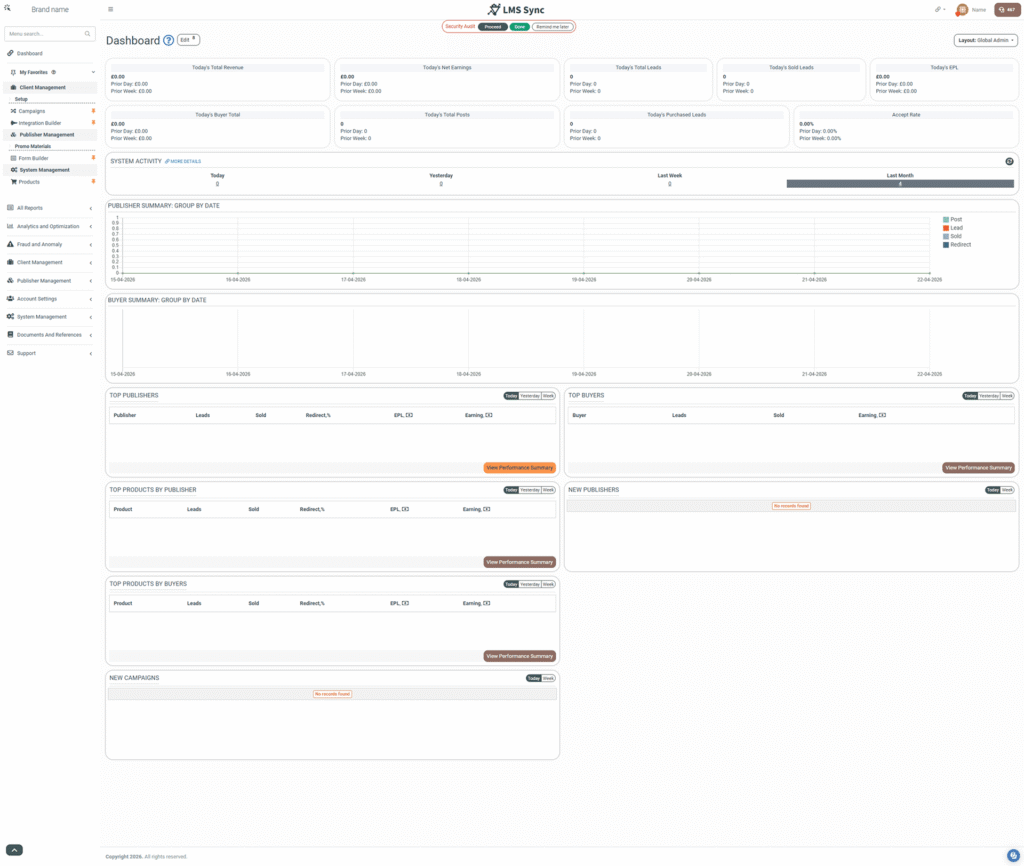
Admin Panel Shouldn’t Be This Painful
The admin side is just as disorganized as the affiliate portal, only with more unnecessary clutter. Modules like HitMetrix or E-Delivery do not even make sense to use when there are modern alternatives like HotJar and Mailchimp. The most frustrating part is the Books360 module. Invoicing and payments are essential to affiliate management, yet Phonexa forces admins to pay for an extra module just to handle basic billing – a feature that is integrated into the standard price of every other tool on the market.
Where Productivity Goes to Die
After over a year of using Phonexa, we were constantly frustrated with little things that should take 30 seconds, but Phonexa takes you on a full 15-minute, multi-step journey where the chance of making a mistake is absurd.
Here are the daily frustrations that make you want to throw your monitor out the window:
- Lead-Loss by Design: Want to receive leads from an affiliate? You have to manually whitelist every single domain they use. There is no “allow by default” option. If you miss one, your leads go straight to the trash, and you won’t even notice until the money is gone.
- Logic-Free Navigation: You won’t find “Lead Export” in the Lead Logs. No, they hid it in System Management. Because that makes sense… to absolutely no one.
- The 6-Month Nightmare: If you need an export of the last 6 months, Phonexa gives you 6 separate files. Why? Because their legacy architecture can’t handle a single unified export.
- 10 Minutes of Clicking: A simple export involves a 10-minute odyssey of clicking, naming products, authorizing, and waiting. It’s an administrative burnout machine.
Another frustrating thing is the data fragmentation. Performance is trapped in isolated silos: calls, clicks, and leads never meet. Without a unified dashboard, cross-channel analysis becomes a manual spreadsheet nightmare.
“A good platform should be self-service. Phonexa is the opposite. It’s so counter-intuitive that you have to reach out to support for every little thing. Honestly, at this point, I see their support team more than my own mother.”
From Fields to Distribution: The Lead-Gen Essentials
But let’s focus on what is really important for standard Phonexa customers: defining form field structures, creating forms from those fields or integrating them through API, and building advertiser integrations to be used in the Ping-tree distribution.
Defining the form field structure
Determining which data to collect manually and which to enrich or validate via third-party services. Unfortunately, Phonexa does not support external requests for data enrichment. In PalDock, however, you can automatically pull data from public databases so you don’t have to ask users for it. You can also validate anythign such as phone numbers, emails, or national IDs in real-time and use autosuggest to help user fill in precise input without typos.
Build your forms
Once your fields are ready, you’ll likely want to build an embeddable multi-step form. Phonexa actually handles customization quite well and offers plenty of options, but its outdated architecture is starting to show. It lacks modern UX elements like push-button interactions, which often requires a ticket to Phonexa support for a custom edit. The real trouble, however, is the embedding process. Phonexa uses a Javascript-based implementation that is a total headache. It requires loading four separate scripts: the form itself, mobile compatibility, parameter tracking, and error translations. To make matters worse, the form isn’t isolated, so any CSS on the affiliate’s website can easily break the layout. PalDock takes a smarter approach. Instead of a fragile multi-script mess, it provides a modern, isolated embed that works perfectly out of the box.
Integrating dozens of buyers
The single most important feature of any lead generation tool is buyer integration, as APIs vary incredibly from one partner to another. Phonexa is relatively strong in this area, covering about 50% of the integrations you’ll encounter.
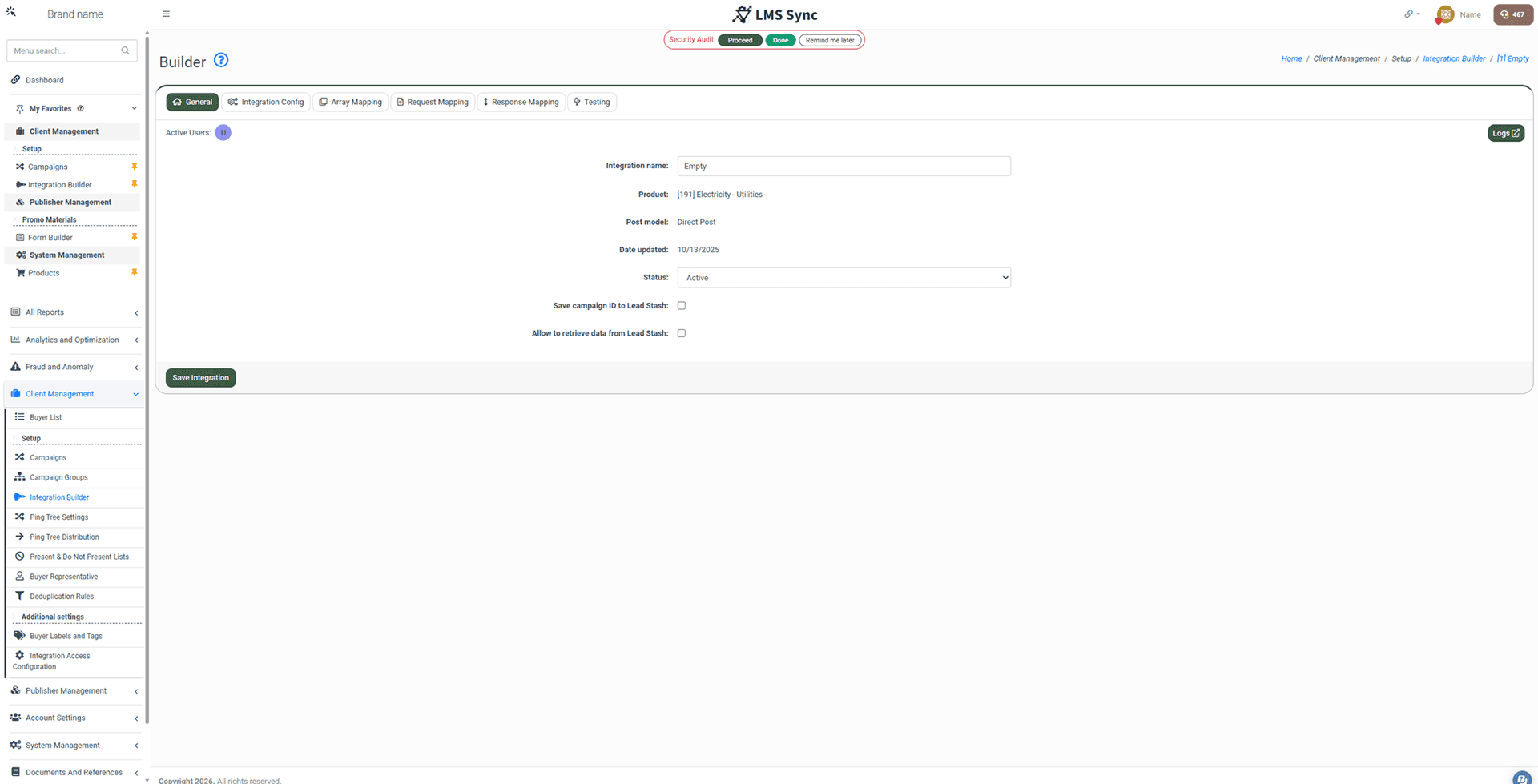
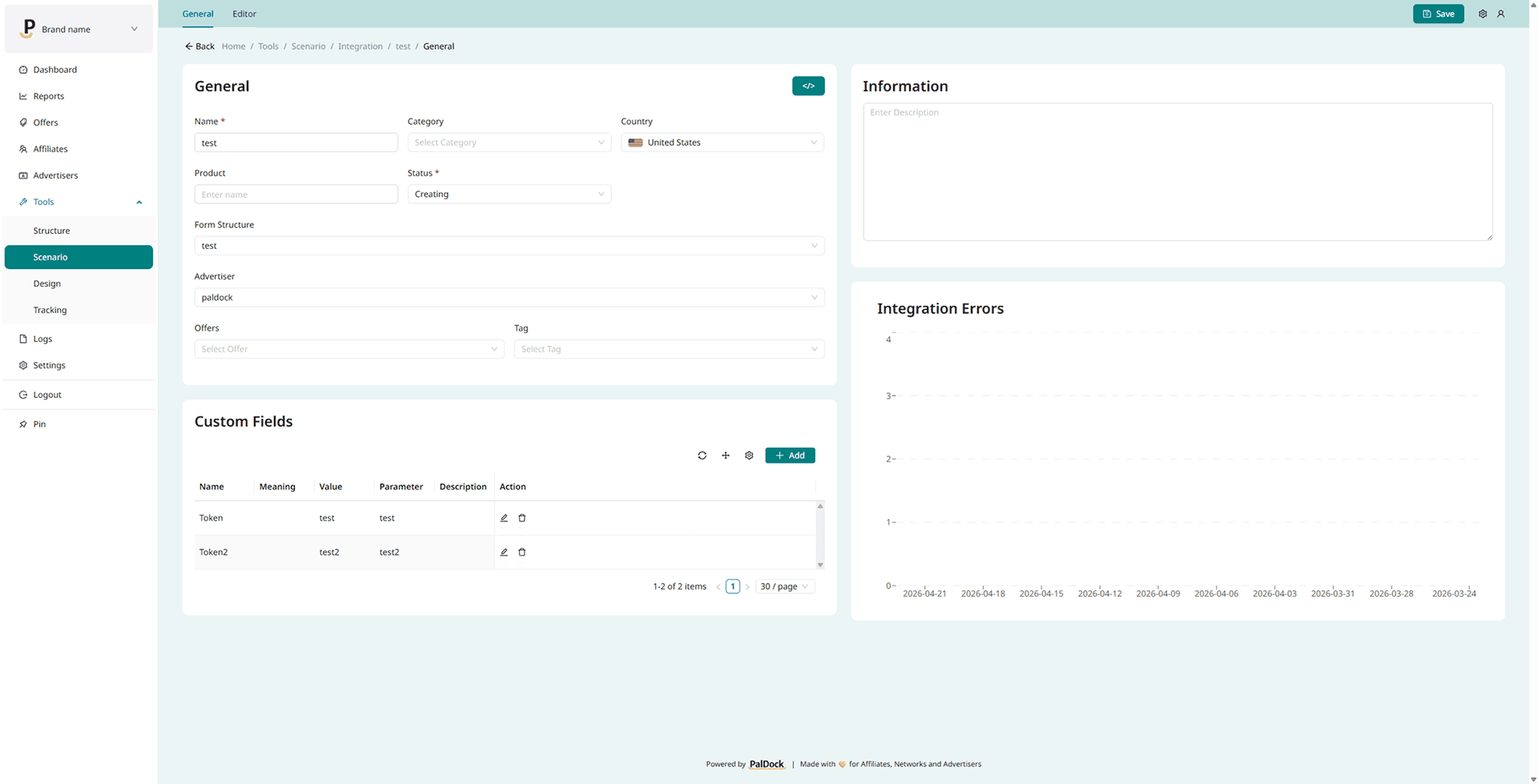
However, the rest must be handled manually by Phonexa IT. While you get five integrations for free, every additional one costs $200.
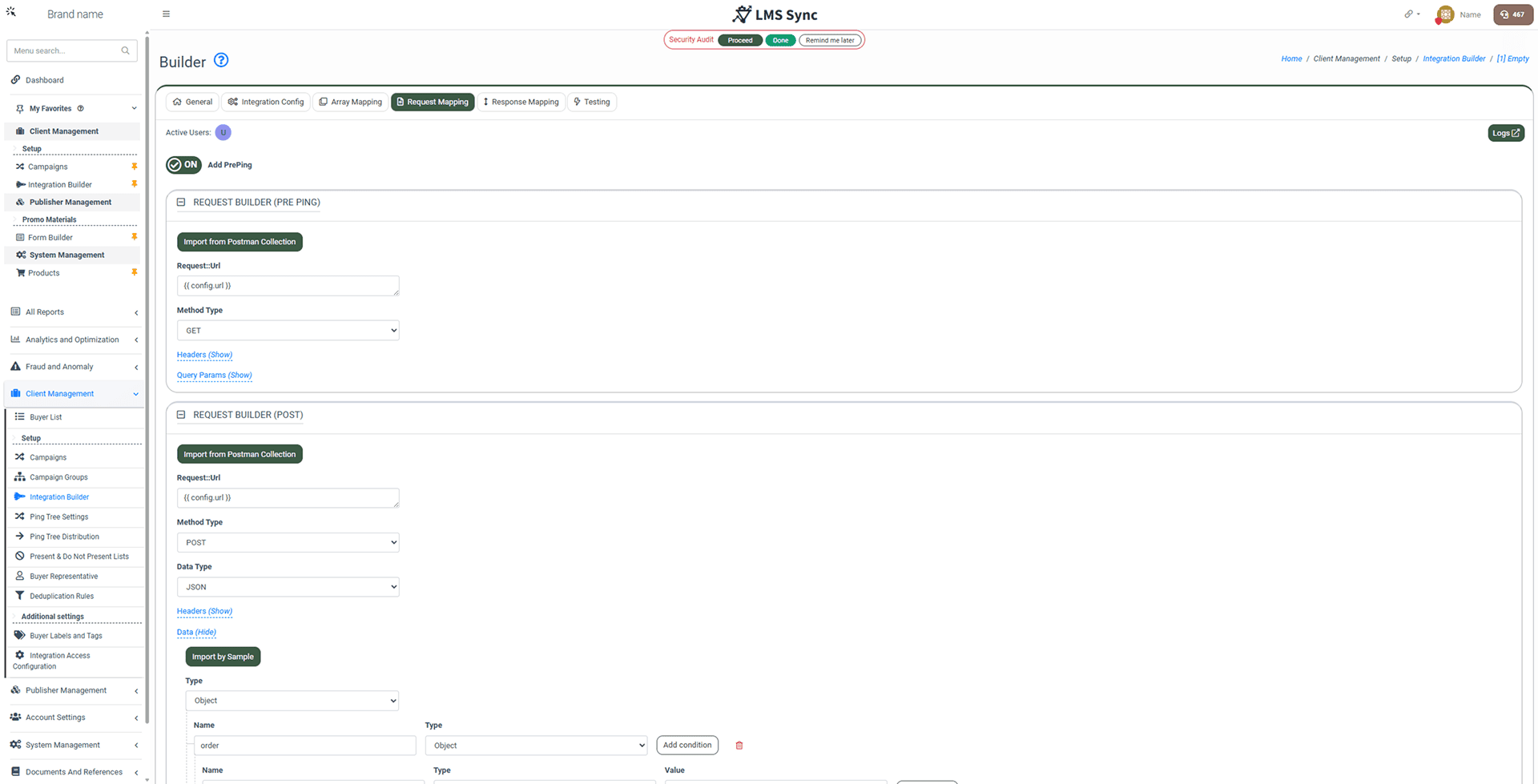
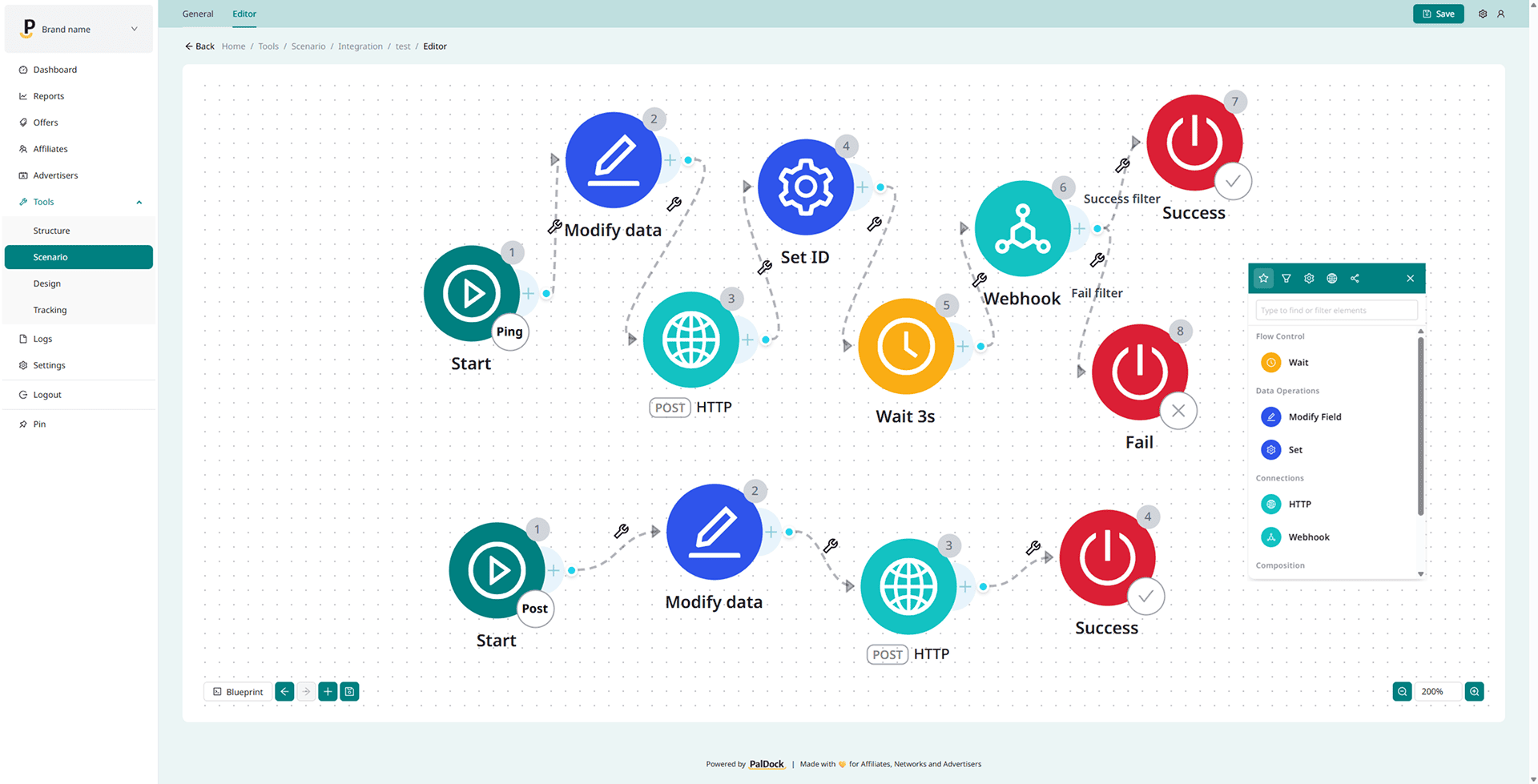
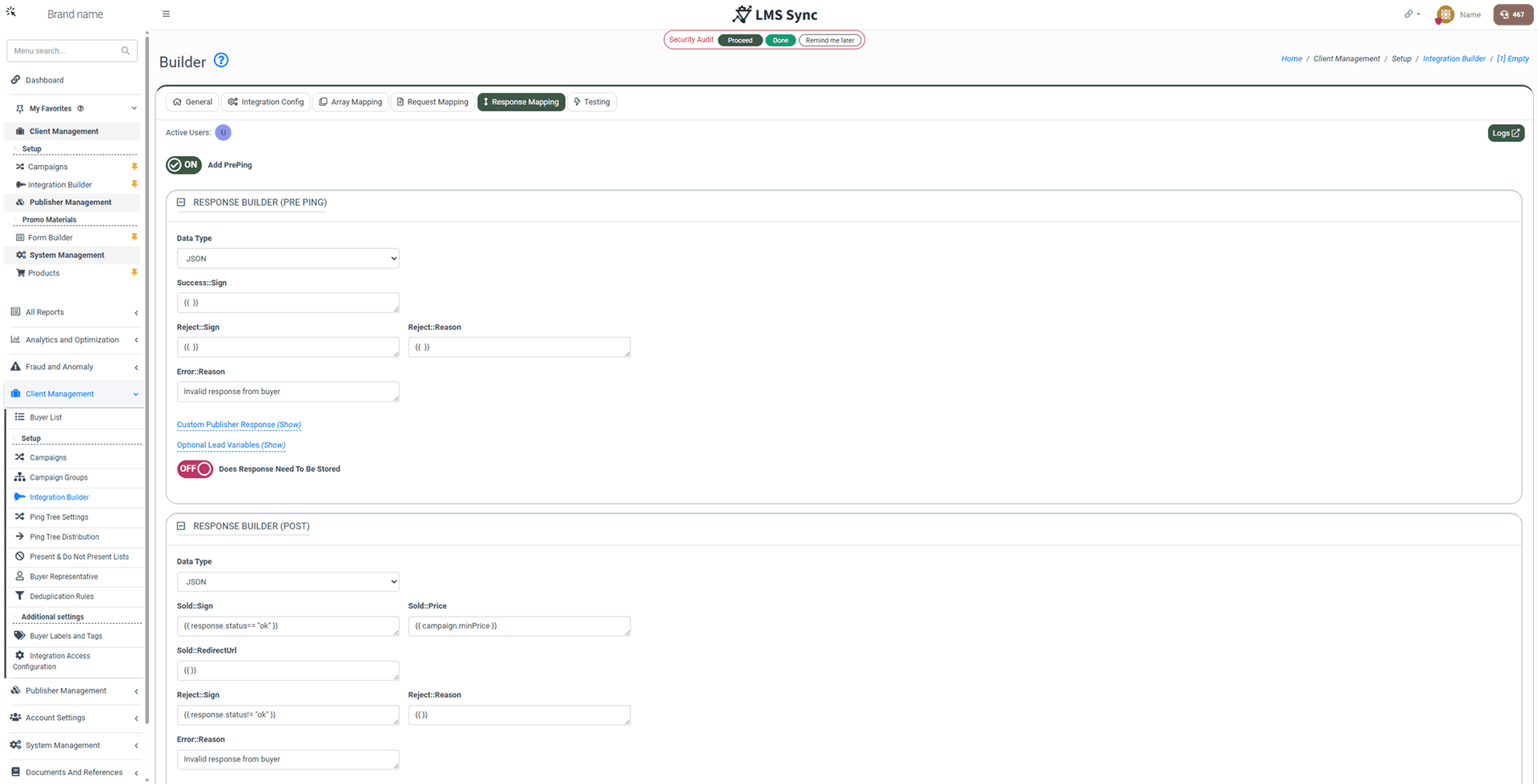
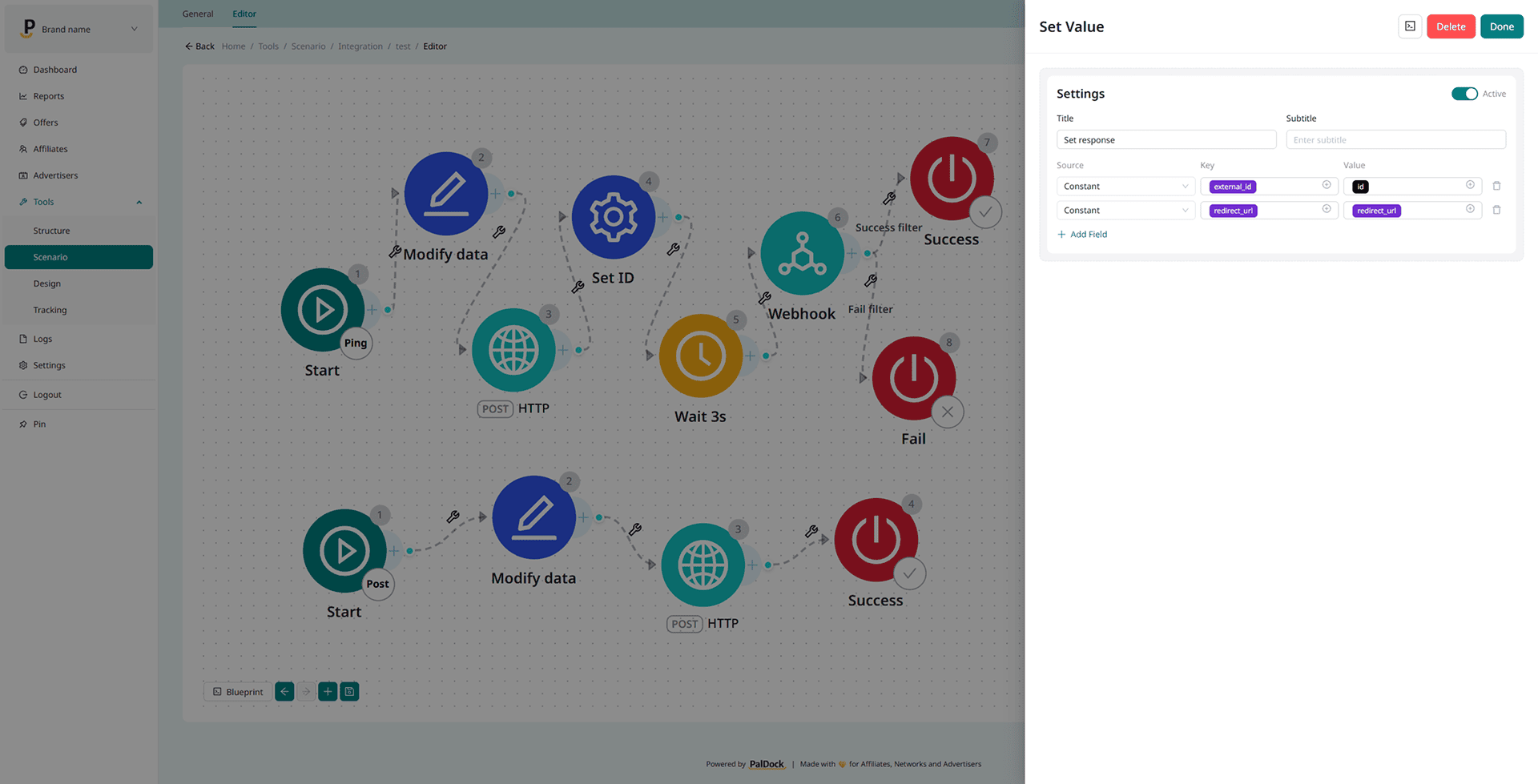
The main problem is that Phonexa’s builder only supports a two-step process: Ping and Post. In reality, many modern integrations require three, four, or even more steps, often involving webhooks or polling loops to wait for specific results. These complex workflows are well beyond Phonexa’s current capabilities.
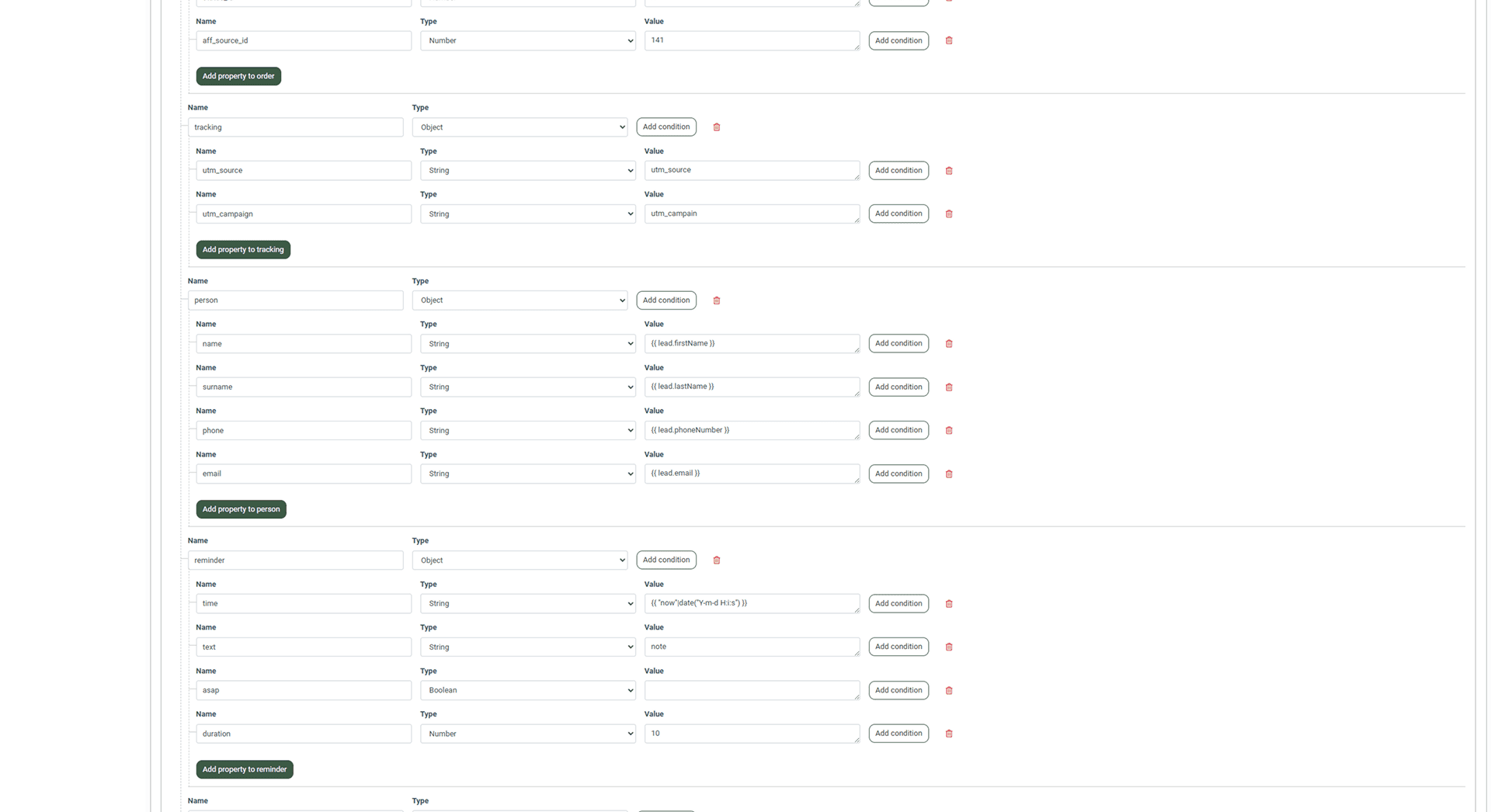
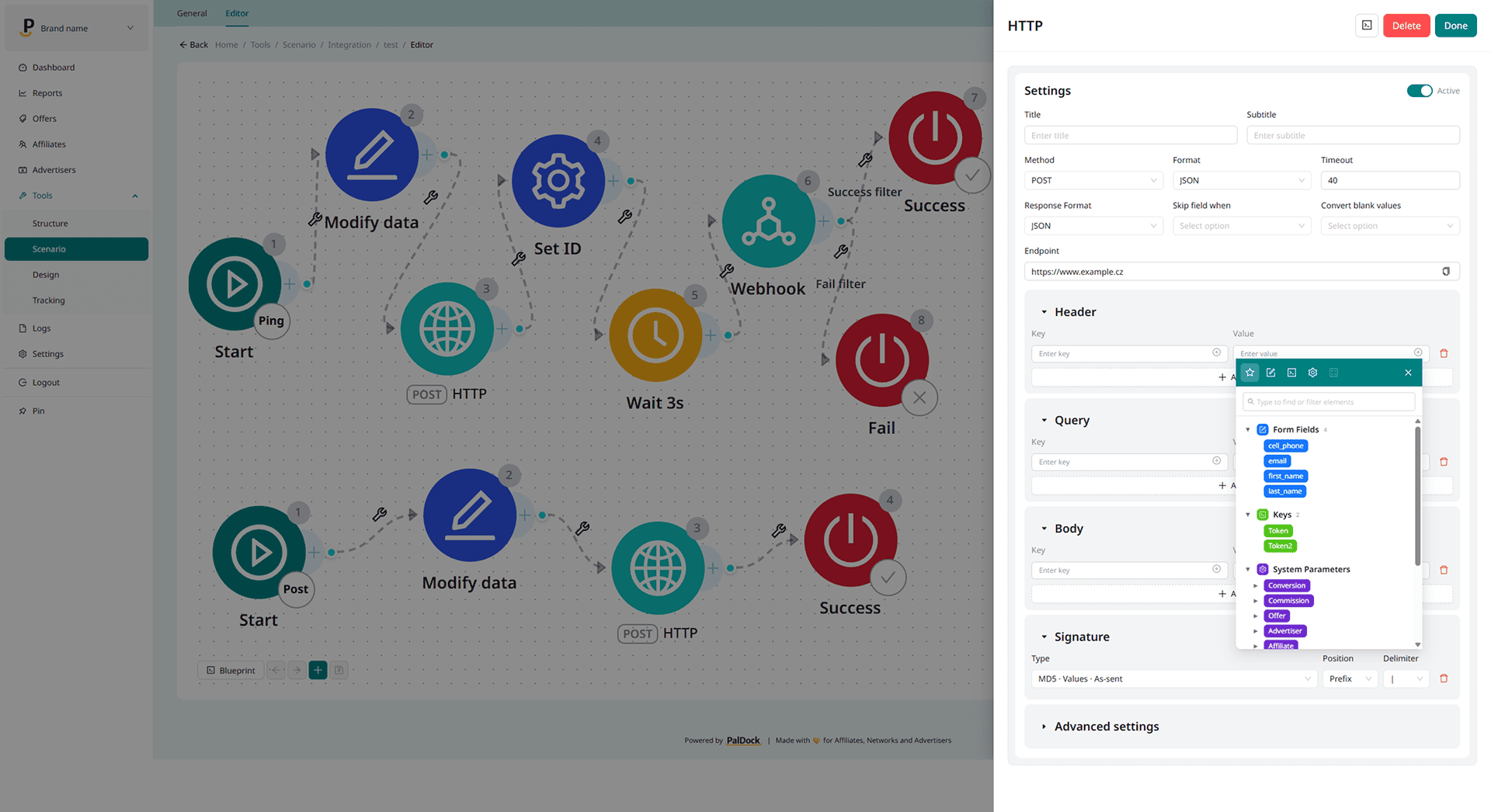
This is where we have to take pride in what we’ve built: our Integration Builder in PalDock is incredibly flexible. After managing hundreds of unique API integrations, we have yet to encounter a single one that was impossible to implement.
Selling leads via Ping-Tree
Once your fields are defined and integrations are ready, you need to sell your leads for the best price. That is where the Ping-tree distrbution comes in. It’s the brain of your operation, ensuring every lead is sold for the highest price. While Phonexa supports standard models like exclusive sales and multi-sell, it lacks proper support for Ping-Pick-Post distributions.
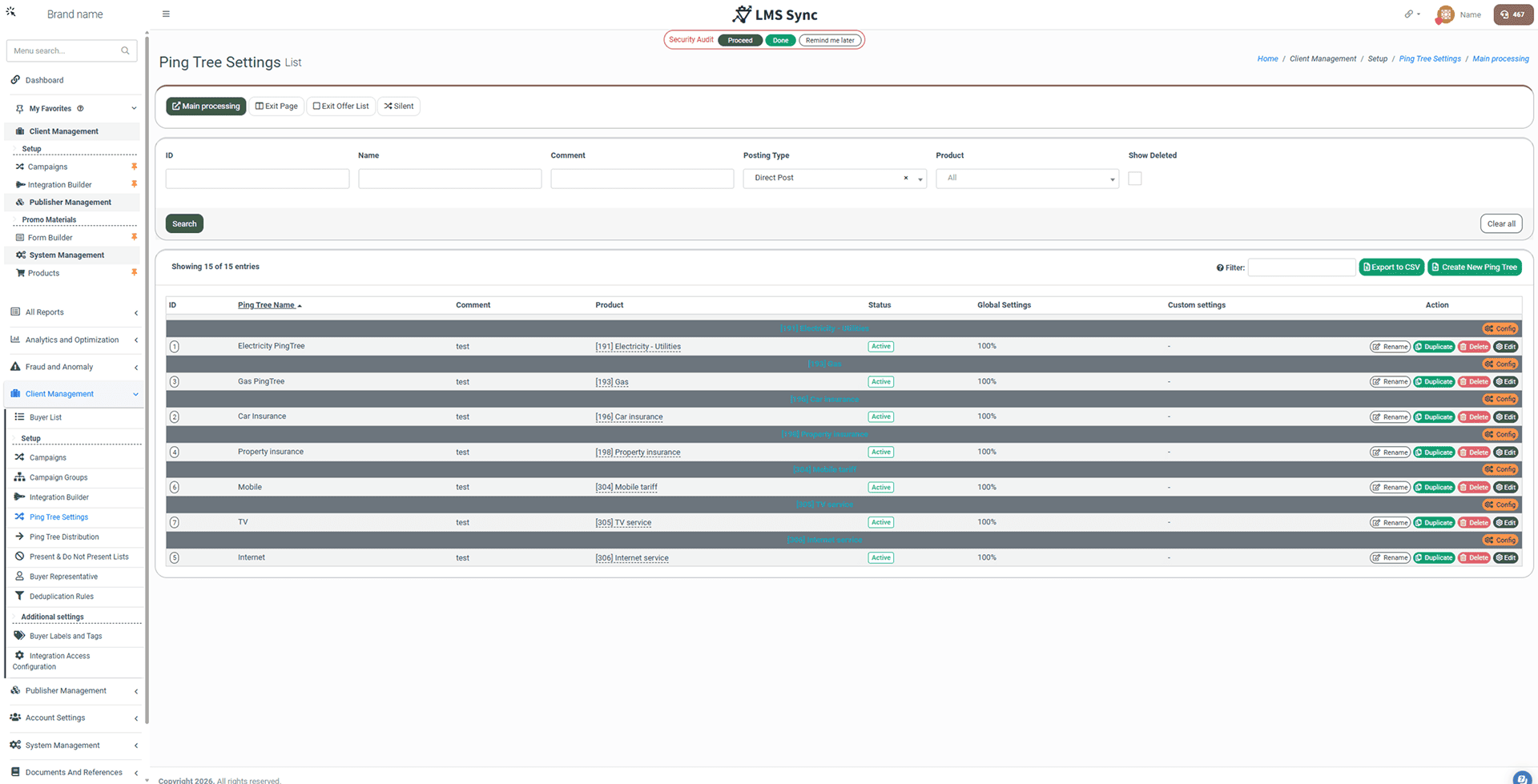
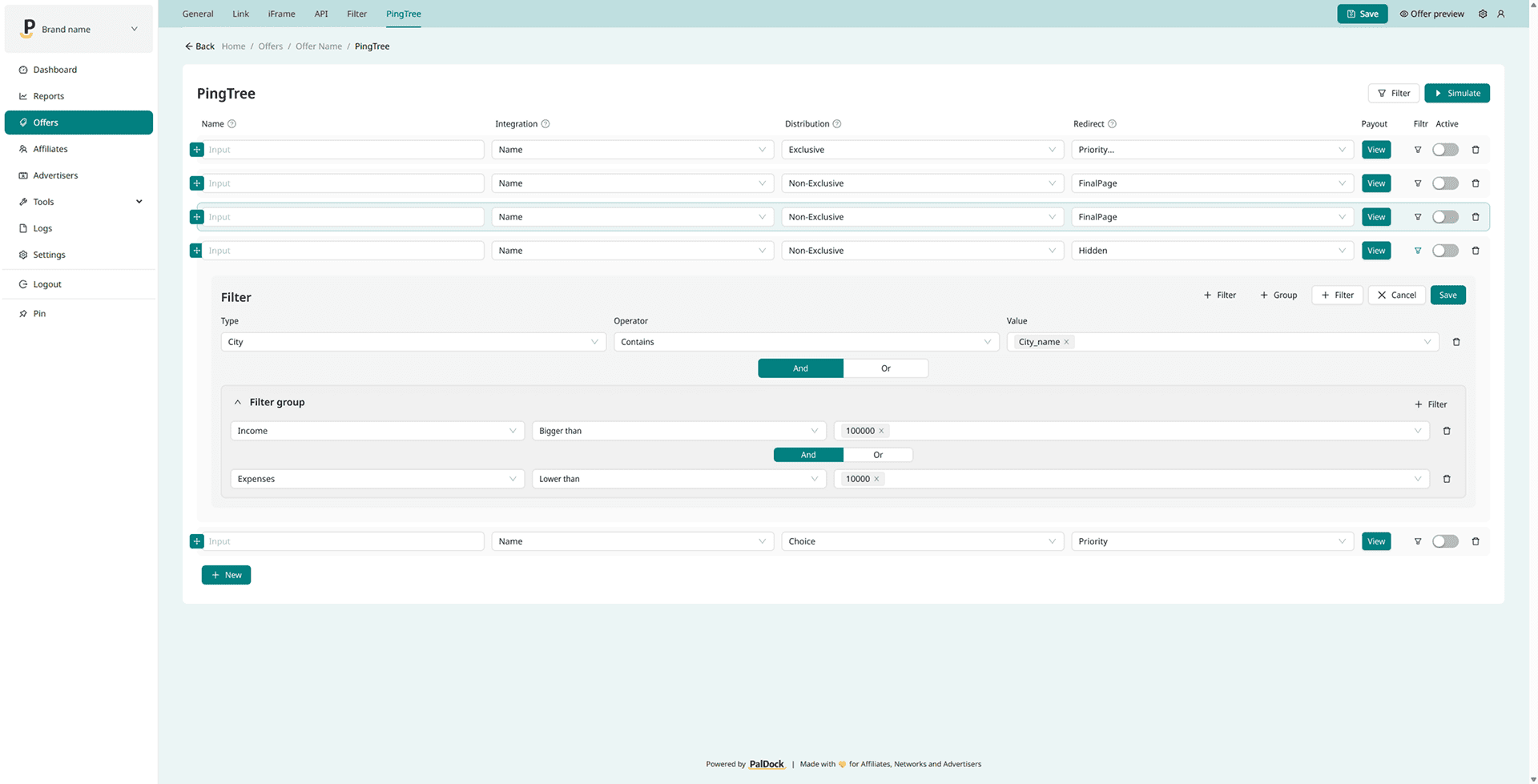
The post-sale user experience is also limited. Phonexa can redirect a user to a URL received from the advertiser or show a basic thank-you page, but it cannot handle a “Result Page” that displays results from multiple successful advertisers at once.
Client story
From the very beginning, the client’s onboarding experience was a struggle. Although Phonexa’s team was responsive, detailed answers required digging through a poorly structured and incomplete knowledge base. They spent hours looking for solutions that should have been easily accessible. To make things worse, they were initially assigned to the US support team, without being told that a UK team existed. Weeks were lost due to time zone delays before they discovered the UK support office by accident. At no point were they informed of this by Phonexa.
“Basic things were unnecessarily complicated“
“On paper, Phonexa checked all the boxes during our vendor selection. But once we started the implementation, we realized that many features only work through awkward workarounds or not at all in real use. The platform is complex, but not intuitive for affiliate partners, which results in higher support needs and significantly more time spent on management tasks that should be simple.”
“On paper, Phonexa checked all the boxes during our vendor selection. But once we started the implementation, we realized that many features only work through awkward workarounds or not at all in real use. The platform is complex, but not intuitive for affiliate partners, which results in higher support needs and significantly more time spent on management tasks that should be simple.”
“Basic things were unnecessarily complicated. Features that are standard in other platforms were either missing or designed in a way that made them unusable. For example, creating affiliate accounts was incredibly time-consuming. On other platforms, importing 40 partners takes about 5 minutes. With Phonexa, we had to manually click through each one, following an overly complex flow and do it separately for link and lead module. That means the same repetitive work had to be done twice, taking up nearly 2 hours instead of 5 minutes. We wanted to use our own subdomain, but that would’ve cost us an extra $200/month. The currency couldn’t be changed, everything was shown in GBP despite us working with local currency. There was no localization support, no local language, no support for diacritics or any customizations.”

Jan Stejskal
Affiliate marketing consultant
Ultimately, while they technically completed the integration, it became clear that Phonexa was not viable for long-term use. The interface confused their partners, core features were split across multiple modules, and conversion tracking was inconsistent and limited. They wanted to track multiple lead stages throughout the process and assign different payouts to affiliates based on those stages, not just “Lead Created.” However, that wasn’t possible, so they had to settle for basic tracking and abandon more advanced logic. After a thorough evaluation and growing inefficiencies, the client decided to leave Phonexa.
Want to discover other areas where Phonexa falls short? Check the comparison below.
Phonexa vs PalDock
We spent hundreds of hours researching our competitors. Instead of guessing, we built a full step-by-step guide on How to choose the right affiliate software. We used it ourselves to analyze dozens of different tools, mapping over 30 features and limitations along the way. We didn’t stop at the surface. We actually integrated them and went through their onboarding like real users. These are the key differences:
| Phonexa | PalDock | |
|---|---|---|
| Tracks affiliate links, embedded forms and API leads |  | |
| All traffic channels (link, forms, API) in one dashboard |  | |
| Advanced lead handling | | |
| Advanced tracking | | |
| Commission levels with different paid goals | | |
| Conversion approval | ⚠️ | |
| Multiple languages and currencies | | |
| GDPR compliant | | |
The Affiliate Platform Guide
Everything you need to choose the right affiliate platform in one place. Download the complete guide and keep it as your handy reference.

Tracks affiliate links, embedded forms and API leads
Phonexa and PalDock are among the very few tools in the world that support tracking affiliate link clicks, embedded forms, and API-based lead delivery within a single platform. But even in this small group, not every tool does it well. Phonexa is fairly capable in this area but lacks advanced features such as lead validation or field modification before sending. If forms and API-based leads are important to you, choosing the right tool is crucial. Make sure to pay close attention to all the specific features related to lead handling and delivery.
All traffic channels (link, forms, API) in one dashboard
Having all traffic channels such as affiliate links, embedded forms and API leads in one unified dashboard is a huge advantage. Whether you are an admin or an affiliate, you can instantly see all performance data in one place without switching between different sections or searching through multiple reports. It saves time, reduces confusion and gives a clear overview of what is working. For admins, it improves decision-making. For affiliates, it makes tracking results easier and more transparent.
Advanced lead handling
In Phonexa, you can map fields from Phonexa to a third party API integration, including select boxes with multiple predefined options (called “array mapping” in Phonexa). However, your options for modifying those fields and their values are very limited. You can apply basic conditions to decide whether a field should be sent, but you cannot actually transform the data. This becomes a problem when the third party requires a specific format or when you want to adjust the data to better sell the lead. See our article on How to handle leads.
Advanced tracking
In Phonexa, you can’t combine pixel tracking and S2S postback tracking to maximize traffic attribution, which is an industry standard that allows cookie-based and cookieless methods to complement each other. In Phonexa, you’re forced to choose one or the other, which effectively prevents proper tracking. That is problematic because Phonexa pixel tracking is flawed. One of our clients’ affiliate programs saw 50% drop in measured affiliate traffic after moving to Phonexa and using their tracking pixel. They had to replicate the entire first-party pixel tracking setup on their side (and use postbacks instead) just to use the tool.
Commission levels with different paid goals
Setting commission tiers in Phonexa is technically possible, but only if you’re on the $1,000/month enterprise plan. Even then, it’s not really usable. One of our client tried to build a setup with 12 products like mortgage, insurance, utilities etc., each having four statuses: lead created, validated, processed, and sold. The idea was to pay different affiliates based on trust. Those they trusted most would be paid for lead created, which is evaluated instantly. Less trusted partners would get paid only for lead sold (meaning the contract was signed), which for some products might take over a month. Others would fall somewhere in between. For affiliates buying traffic, getting the commission as soon as possible is crucial to maintain their volumes.
In theory, that’s doable. But in Phonexa, all goals are public. That means every affiliate sees the entire list – in this case 48 goals (12 products times 4 statuses), even if only 12 apply to them. It creates total confusion. Affiliates start asking why they see 48 goals, why they’re not paid for certain ones, and so on. Technically, Phonexa supports multiple goals, but in practice it’s nearly impossible to manage cleanly. On top of that, this setup only works in the LYNX module for affiliate links, not in LMS Sync, which handles leads.
Conversion approval
If you are surprised that affiliate marketing software which should at its core handle commission approval and payouts cannot mark conversions as approved or rejected then welcome to the club! Phonexa lacks a conversion approval workflow in its LMS module. You cannot set conversions to pending and approve or reject them later. That option is only available in the Lynx module via the conversion approved period setting.
What is more, Phonexa does not track which conversions have already been paid out. There is no built in paid or unpaid status for conversions. If you force affiliates to get paid every month so you know payouts are complete, that might work. Until an affiliate wants to move payment to the next month or forgets to invoice. Then you’ll need to keep everything organized in a some excel spreadsheet so you don’t accidentally pay the same conversions twice.

Nothing compares. Upgrade your stack.
Power your affiliate & lead gen
with one smart platform.
Who is Phonexa (not) for?
One of the typical problems with big, US-based companies listed on the stock market is that they’ll squeeze every last dollar out of their clients just to keep shareholders happy. Phonexa is no exception. Unlike their competitor, Tune, who at least has the decency to offer overpriced customizations, Phonexa doesn’t let you customize anything at all. No matter how much you’re willing to pay, you’re stuck with what they give you.
But if you’re a company based in the US or UK focusing on call tracking, Phonexa might be the right tool for you. If you’re not planning to do anything ambitious with affiliate or leadgen, their features should be enough.
Phonexa Pricing
Phonexa offers several pricing tiers, but some important details are easy to miss. The entry-level Lite plan starts at $250/month with a $500 setup fee, though it lacks key features like commission groups. Those are only available in the Enterprise plan at $1,000/month, plus a $2,000 setup fee.
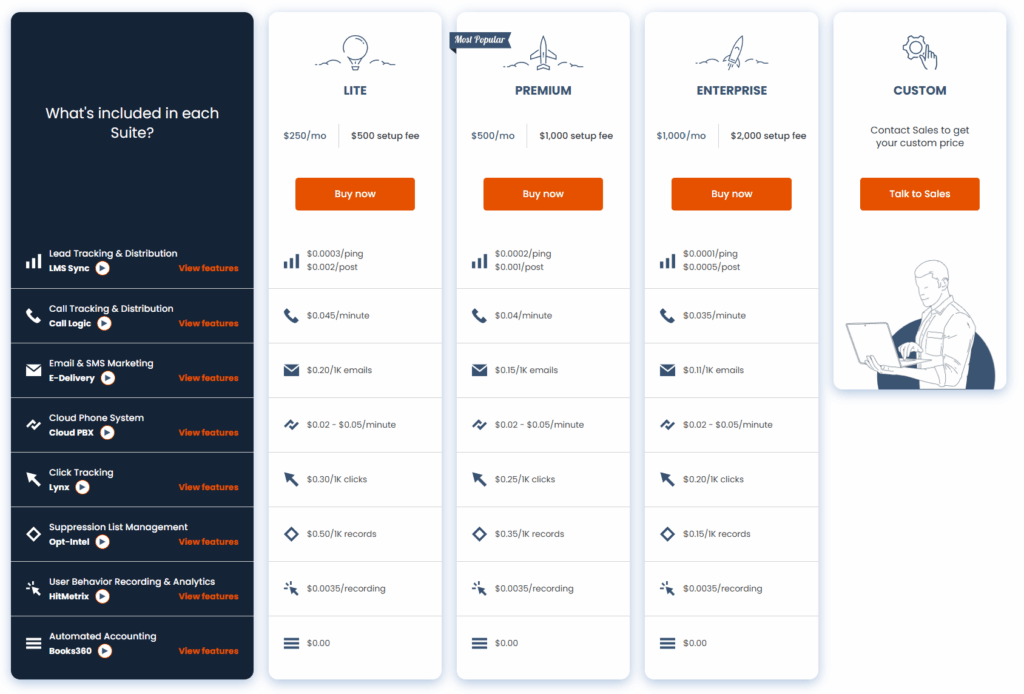
One option is to start with the Lite plan and upgrade later to Enterprise or another tier. This way, you can save up to $1,500 on setup fees. There’s also an additional fee per click or lead, both starting at around $0.0003. The fee decreases as your volume grows and is generally fair and predictable.
One thing to be aware of: if you request to switch your support team from the US to the UK, your monthly fee may be billed in GBP instead of USD, effectively raising the price by about 25%. Something to keep in mind, especially if you’re based in Europe.
Summary
Phonexa has plenty of flaws and half-baked features, but it’s one of the very few platforms in the world that supports lead generation through embedded forms and API for collecting and distributing leads. That’s its biggest strength.
Other than that, it falls short. Phonexa is missing some absolutely basic features that every affiliate platform should have, like conversion approval, flexible payout goals, and more. If you don’t need lead generation tools, you’re better off looking elsewhere. If you do, get ready to deal with a lot of annoying problems.