Use global fields and skip mapping entirely
Every prebuilt integration is already mapped to PalDock’s global fields. Populate them once in your lead structure, whether leads arrive through the API or form, and the same fields feed every integration you run.
Integration overview
This prebuilt PalDock integration connects your lead flow directly to the advertiser. It handles field mapping, request delivery and response processing, so you can start sending leads without building the integration from scratch.
The integration uses PalDock’s global fields and returns standardized outcomes for reporting and routing, while preserving advertiser response details for troubleshooting.
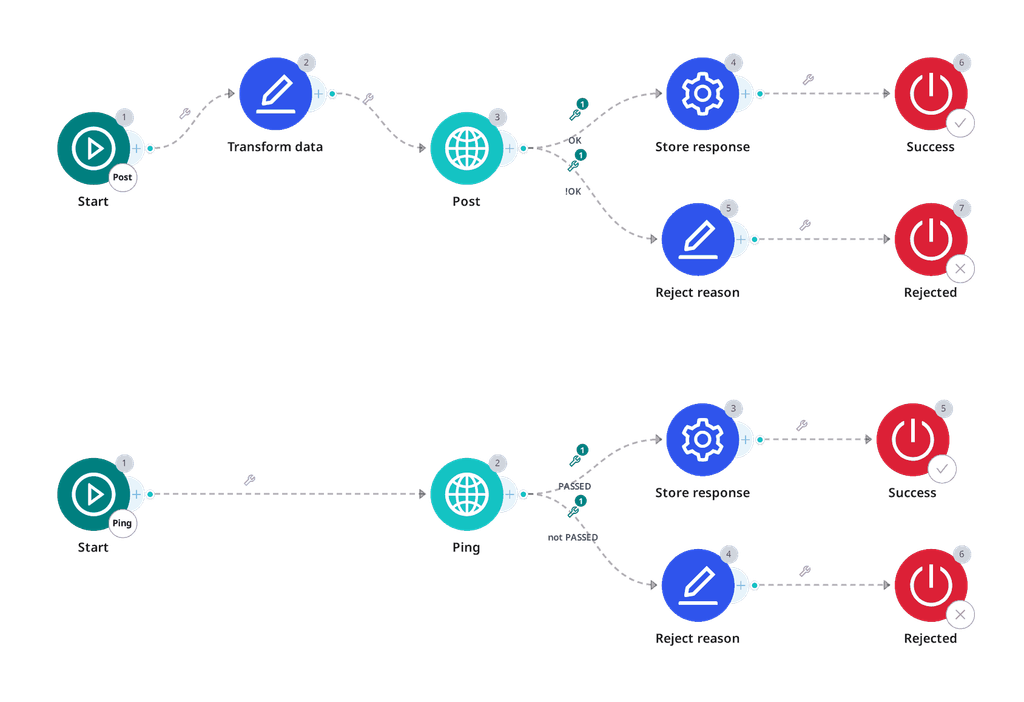
Blueprint
{
"nodes": [
{
"id": "1-1",
"type": "startNode",
"position": {
"x": -620,
"y": 420
},
"data": {
"formData": {
"active": true,
"title": "",
"subtitle": "",
"flow": "ping",
"beType": "integration"
}
}
},
{
"id": "2-1",
"type": "startNode",
"position": {
"x": -620,
"y": 40
},
"data": {
"formData": {
"active": true,
"title": "",
"subtitle": "",
"flow": "post",
"beType": "integration"
}
}
},
{
"id": "1-2",
"type": "httpNode",
"position": {
"x": -210,
"y": 420
},
"data": {
"formData": {
"active": true,
"title": "Ping",
"subtitle": "",
"method": "PUT",
"endpoint": "{endpoint}/api/v1/uveracek-cpl/pre-check",
"timeout": 40,
"format": "application/json",
"parser": "json",
"notsend": null,
"convert_data": null,
"headers": [
{
"key": "Accept",
"value": "application/json"
}
],
"query": [
{
"key": "apiKey",
"value": "{token}"
}
],
"body": [
{
"key": "lastName",
"value": "{data_last_name}"
},
{
"key": "firstName",
"value": "{data_first_name}"
},
{
"key": "birthNumber",
"value": "{data_nin}"
}
],
"signature": null,
"insecure": null
}
}
},
{
"id": "1-3",
"type": "setNode",
"position": {
"x": 40,
"y": 360
},
"data": {
"formData": {
"active": true,
"title": "Store response",
"subtitle": "",
"fields": [
{
"key": "{custom_process_id}",
"value": "{parsedBody.processId}"
}
]
}
}
},
{
"id": "1-5",
"type": "endNode",
"position": {
"x": 280,
"y": 360
},
"data": {
"formData": {
"active": true,
"title": "Success",
"subtitle": "",
"success": "success"
}
}
},
{
"id": "1-4",
"type": "modifyFieldNode",
"position": {
"x": 40,
"y": 520
},
"data": {
"formData": {
"active": true,
"title": "Reject reason",
"subtitle": "",
"data": [
{
"fieldName": "{reason}",
"fields": [
{
"source": "{parsedBody.status}",
"operator": "always",
"value": "",
"value2": "",
"modification": "replace",
"pattern": "",
"output": "Unspecified"
},
{
"source": "{parsedBody.status}",
"operator": "equals",
"value": "REJECTED",
"value2": "",
"modification": "replace",
"pattern": "",
"output": "Not Eligible"
}
]
},
{
"fieldName": "{reason_detail}",
"fields": [
{
"source": "{status}",
"operator": "always",
"value": "",
"value2": "",
"modification": "replace",
"pattern": "",
"output": "pre-check http {status}: {parsedBody.status}"
}
]
}
]
}
}
},
{
"id": "1-6",
"type": "endNode",
"position": {
"x": 300,
"y": 520
},
"data": {
"formData": {
"active": true,
"title": "Rejected",
"subtitle": "",
"success": "failed"
}
}
},
{
"id": "2-2",
"type": "modifyFieldNode",
"position": {
"x": -430,
"y": -20
},
"data": {
"formData": {
"active": true,
"title": "Transform data",
"subtitle": "",
"data": [
{
"fieldName": "{income_type}",
"fields": [
{
"source": "{data_income_type}",
"operator": "equals",
"value": "full-time",
"value2": "",
"modification": "replace",
"pattern": "",
"output": "EMPLOYEE"
},
{
"source": "{data_income_type}",
"operator": "equals",
"value": "self-employed",
"value2": "",
"modification": "replace",
"pattern": "",
"output": "ENTREPRENEUR"
},
{
"source": "{data_income_type}",
"operator": "equals",
"value": "parental",
"value2": "",
"modification": "replace",
"pattern": "",
"output": "OTHER"
},
{
"source": "{data_income_type}",
"operator": "equals",
"value": "pension",
"value2": "",
"modification": "replace",
"pattern": "",
"output": "RETIREE"
},
{
"source": "{data_income_type}",
"operator": "equals",
"value": "unemployed",
"value2": "",
"modification": "replace",
"pattern": "",
"output": "OTHER"
},
{
"source": "{data_income_type}",
"operator": "equals",
"value": "other",
"value2": "",
"modification": "replace",
"pattern": "",
"output": "OTHER"
},
{
"source": "{data_income_type}",
"operator": "regex_not_match",
"value": "^(full-time|self-employed|parental|pension|unemployed|other)$",
"value2": "",
"modification": "replace",
"pattern": "",
"output": "OTHER"
}
]
},
{
"fieldName": "{own_property}",
"fields": [
{
"source": "{data_own_property}",
"operator": "equals",
"value": "yes",
"value2": "",
"modification": "replace",
"pattern": "",
"output": "1"
},
{
"source": "{data_own_property}",
"operator": "equals",
"value": "no",
"value2": "",
"modification": "replace",
"pattern": "",
"output": "0"
}
]
}
]
}
}
},
{
"id": "2-3",
"type": "httpNode",
"position": {
"x": -210,
"y": 40
},
"data": {
"formData": {
"active": true,
"title": "Post",
"subtitle": "",
"method": "PUT",
"endpoint": "{endpoint}/api/v1/uveracek-cpl/applicant",
"timeout": 40,
"format": "application/json",
"parser": "json",
"notsend": null,
"convert_data": null,
"headers": [
{
"key": "Accept",
"value": "application/json"
}
],
"query": [
{
"key": "apiKey",
"value": "{token}"
}
],
"body": [
{
"key": "email",
"value": "{data_email}"
},
{
"key": "phone",
"value": "{data_cell_phone}"
},
{
"key": "lastName",
"value": "{data_last_name}"
},
{
"key": "firstName",
"value": "{data_first_name}"
},
{
"key": "ipAddress",
"value": "{ip_address}"
},
{
"key": "processId",
"value": "{custom_process_id}"
},
{
"key": "incomeType",
"value": "{income_type}"
},
{
"key": "loanAmount",
"value": "{data_requested_amount}"
},
{
"key": "loanPeriod",
"value": "{data_period}"
},
{
"key": "birthNumber",
"value": "{data_nin}"
},
{
"key": "idCardNumber",
"value": "{data_identity_card_number}"
},
{
"key": "childrenCount",
"value": "0"
},
{
"key": "maritalStatus",
"value": "SINGLE"
},
{
"key": "monthlyIncome",
"value": "{data_monthly_income}"
},
{
"key": "propertyOwner",
"value": "toBool({own_property})"
},
{
"key": "monthlyPayment",
"value": "{data_expenses}"
},
{
"key": "dateOfAgreement",
"value": "{created_date}"
},
{
"key": "contactAddress.zip",
"value": "{data_contact_zip}"
},
{
"key": "contactAddress.city",
"value": "{data_contact_city}"
},
{
"key": "permanentAddress.zip",
"value": "{data_zip}"
},
{
"key": "contactAddress.street",
"value": "{data_contact_street} {data_contact_house_number}"
},
{
"key": "permanentAddress.city",
"value": "{data_city}"
},
{
"key": "permanentAddress.street",
"value": "{data_street} {data_house_number}"
}
],
"signature": null,
"insecure": null
}
}
},
{
"id": "2-4",
"type": "setNode",
"position": {
"x": 40,
"y": -20
},
"data": {
"formData": {
"active": true,
"title": "Store response",
"subtitle": "",
"fields": [
{
"key": "{redirect_url}",
"value": "{parsedBody.redirectUrl}"
},
{
"key": "{external_id}",
"value": "{parsedBody.refno}"
}
]
}
}
},
{
"id": "2-6",
"type": "endNode",
"position": {
"x": 300,
"y": -20
},
"data": {
"formData": {
"active": true,
"title": "Success",
"subtitle": "",
"success": "success"
}
}
},
{
"id": "2-5",
"type": "modifyFieldNode",
"position": {
"x": 40,
"y": 140
},
"data": {
"formData": {
"active": true,
"title": "Reject reason",
"subtitle": "",
"data": [
{
"fieldName": "{reason}",
"fields": [
{
"source": "{parsedBody.message}",
"operator": "always",
"value": "",
"value2": "",
"modification": "replace",
"pattern": "",
"output": "Unspecified"
},
{
"source": "{parsedBody.status}",
"operator": "equals",
"value": "UNSATISFACTORY",
"value2": "",
"modification": "replace",
"pattern": "",
"output": "Not Eligible"
},
{
"source": "{status}",
"operator": "equals",
"value": "400",
"value2": "",
"modification": "replace",
"pattern": "",
"output": "Not Eligible"
},
{
"source": "{parsedBody.status}",
"operator": "equals",
"value": "DUPLICITY",
"value2": "",
"modification": "replace",
"pattern": "",
"output": "Duplicate"
},
{
"source": "{status}",
"operator": "regex_match",
"value": "^(403|500)$",
"value2": "",
"modification": "replace",
"pattern": "",
"output": "ERROR"
}
]
},
{
"fieldName": "{reason_detail}",
"fields": [
{
"source": "{status}",
"operator": "always",
"value": "",
"value2": "",
"modification": "replace",
"pattern": "",
"output": "http {status}: {parsedBody.message}"
}
]
}
]
}
}
},
{
"id": "2-7",
"type": "endNode",
"position": {
"x": 300,
"y": 140
},
"data": {
"formData": {
"active": true,
"title": "Rejected",
"subtitle": "",
"success": "failed"
}
}
}
],
"edges": [
{
"id": "edge-1-1-1-2",
"source": "1-1",
"target": "1-2",
"type": "customEdge",
"data": {
"active": true,
"title": "",
"subtitle": "",
"conditions": []
}
},
{
"id": "edge-2-1-2-2",
"source": "2-1",
"target": "2-2",
"type": "customEdge",
"data": {
"active": true,
"title": "",
"subtitle": "",
"conditions": []
}
},
{
"id": "edge-1-2-1-3",
"source": "1-2",
"target": "1-3",
"type": "customEdge",
"data": {
"active": true,
"title": "PASSED",
"subtitle": "",
"conditions": [
{
"value": "{parsedBody.status}",
"operator": "regex_match",
"output": "PASSED",
"output2": ""
}
]
}
},
{
"id": "edge-1-2-1-4",
"source": "1-2",
"target": "1-4",
"type": "customEdge",
"data": {
"active": true,
"title": "not PASSED",
"subtitle": "",
"conditions": [
{
"value": "{parsedBody.status}",
"operator": "regex_not_match",
"output": "PASSED",
"output2": ""
}
]
}
},
{
"id": "edge-1-3-1-5",
"source": "1-3",
"target": "1-5",
"type": "customEdge",
"data": {
"active": true,
"title": "",
"subtitle": "",
"conditions": []
}
},
{
"id": "edge-1-4-1-6",
"source": "1-4",
"target": "1-6",
"type": "customEdge",
"data": {
"active": true,
"title": "",
"subtitle": "",
"conditions": []
}
},
{
"id": "edge-2-2-2-3",
"source": "2-2",
"target": "2-3",
"type": "customEdge",
"data": {
"active": true,
"title": "",
"subtitle": "",
"conditions": []
}
},
{
"id": "edge-2-3-2-4",
"source": "2-3",
"target": "2-4",
"type": "customEdge",
"data": {
"active": true,
"title": "OK",
"subtitle": "",
"conditions": [
{
"value": "{parsedBody.status}",
"operator": "equals",
"output": "OK",
"output2": ""
}
]
}
},
{
"id": "edge-2-3-2-5",
"source": "2-3",
"target": "2-5",
"type": "customEdge",
"data": {
"active": true,
"title": "!OK",
"subtitle": "",
"conditions": [
{
"value": "{parsedBody.status}",
"operator": "not_equals",
"output": "OK",
"output2": ""
}
]
}
},
{
"id": "edge-2-4-2-6",
"source": "2-4",
"target": "2-6",
"type": "customEdge",
"data": {
"active": true,
"title": "",
"subtitle": "",
"conditions": []
}
},
{
"id": "edge-2-5-2-7",
"source": "2-5",
"target": "2-7",
"type": "customEdge",
"data": {
"active": true,
"title": "",
"subtitle": "",
"conditions": []
}
}
]
}How it works
- Copy the blueprint and paste it in your PalDock workspace– Create a new integration in your workspace and paste the blueprint. Every field arrives prefilled.
- Enter your credentials – Paste the secrets you received from advertiser and set your Pingtree
- Send a test lead – Verify the response, then switch the channel live.
FAQ
Do I need my own contract with this advertiser?
Yes. PalDock delivers leads on your behalf, so the commercial agreement and API credentials come from the advertiser directly.
What happens to rejected leads?
The advertiser returns its decision in the delivery response. PalDock reads it and moves rejected leads to the next buyer in your pingtree automatically, so a rejection does not need to end the lead’s journey.
Can I change the field mapping?
Yes, but we do not recommend it. Blueprints are already mapped to PalDock’s global fields. If you use local fields, you need to remap each integration separately.
How long does setup take?
Few clicks, if you already have credentials. The blueprint arrives prefilled and mapped to PalDock’s global fields, so if your lead structure uses them, there is nothing to map. If you use local fields, you map them once.
What the integration does
Start sending leads in 3 clicks
Copy the prebuilt blueprint, add your credentials and start sending leads. No coding, no integration work.
Real-time lead delivery
Send leads to the advertiser instantly as they arrive, without exports, batches or manual processing.
No field mapping headache
PalDock global fields work across all prebuilt integrations. Map your lead data once and reuse it everywhere.
Know exactly why leads fail
Get standardized rejection reasons for reporting and advertiser’s response for the full context and troubleshooting.
API & integration details
Both calls are PUT, and the API key travels as a query parameter.
The pattern to know here: 400 is a business answer, not a fault. The advertiser says “this applicant does not meet the criteria” by returning 400 with UNSATISFACTORY in the body. Treating it as a technical error throws away a mapped rejection.
What will be needed from advertiser
| Key | Purpose |
|---|---|
endpoint | Base API URL. |
token | API key sent as apiKey. |
Flows
Ping, PUT /api/v1/uveracek-cpl/pre-check. Name and national ID only. Returns a processId when it passes.
Post, PUT /api/v1/uveracek-cpl/applicant. Full payload, carrying the processId from the ping. Returns refno and redirectUrl.
The processId is what links the two calls. It is a working value, not the advertiser’s lasting reference, so it goes in a custom_ parameter, refno is what becomes {external_id}.
Calls
PUT {endpoint}/api/v1/uveracek-cpl/pre-check?apiKey={token}
PUT {endpoint}/api/v1/uveracek-cpl/applicant?apiKey={token}
Accept: application/json
format: application/json
Request fields
Ping
| Field | Required | Value |
|---|---|---|
firstName | yes | {g_name_first} |
lastName | yes | {g_name_last} |
birthNumber | yes | {g_id_national_number} |
Post
| Field | Required | Value |
|---|---|---|
processId | yes | {custom_process_id} from the ping |
firstName | yes | {g_name_first} |
lastName | yes | {g_name_last} |
birthNumber | yes | {g_id_national_number} |
idCardNumber | yes | {g_id_card_number} |
email | yes | {g_email} |
phone | yes | {g_phone} |
permanentAddress.street | yes | {g_address_street} {g_address_street_number} |
permanentAddress.city | yes | {g_address_city} |
permanentAddress.zip | yes | {g_address_zip} |
contactAddress.street | yes | {g_address_contact_street} {g_address_contact_street_number} |
contactAddress.city | yes | {g_address_contact_city} |
contactAddress.zip | yes | {g_address_contact_zip} |
loanAmount | yes | {g_amount} |
loanPeriod | yes | {g_period} |
monthlyIncome | yes | {g_fin_income} |
monthlyPayment | yes | {g_fin_expenses} |
incomeType | yes | {g_fin_type}, see enums |
maritalStatus | yes | {g_marital_status}, see enums |
childrenCount | yes | {g_household_children} |
propertyOwner | yes | toBool(...) |
dateOfAgreement | yes | {created_date} |
ipAddress | yes | {ip_address} |
Compose street and house number in the HTTP field. It is not a transformation.
Enums
incomeType: EMPLOYEE, ENTREPRENEUR, RETIREE, OTHER. Maternity, unemployment and anything else map to OTHER.
maritalStatus: SINGLE, MARRIED, DIVORCED, WIDOWED.
Outcomes
| Recognised by | HTTP | Meaning | Reject reason | Frequency |
|---|---|---|---|---|
status: PASSED + processId | 200 | Pre-check passed | , | common |
status: OK + refno | 201 | Accepted | , | occasional |
status: REJECTED | 200 | Pre-check refused, no reason given | Unspecified | common |
status: UNSATISFACTORY | 400 | Does not meet the criteria | Not Eligible | common |
status: DUPLICITY | 400 | Already on file | Duplicate | occasional |
message: UNSATISFACTORY | 400 | Same, without a status field | Not Eligible | occasional |
code: 500, status: error | 500 | Gateway or advertiser failure | , (technical) | rare |
UNSATISFACTORY names a condition, insufficient income, insolvency, a knockout the lead failed, so it is Not Eligible. The pre-check’s bare REJECTED names nothing and is Unspecified. The distinction matters: Unspecified is a bill you can present to the advertiser, Not Eligible reads as a reason already given and nobody asks again.
Do not derive a reason from the 400 itself. 400 here can be either UNSATISFACTORY or DUPLICITY, and the body says which.
Reject reasons come from the standard list. See Reject reason for what each one means and when to use it.
Branching
Ping, passed:
{parsedBody.status} regex match PASSEDPing, refused, a catch-all against the one known success value:
{parsedBody.status} regex not match PASSEDPost, accepted:
{parsedBody.status} equals OKPost, refused:
{parsedBody.status} not equals OK403 and 500 carry no business result and get no branch, PalDock fills those in on its own.
Stored values
| Parameter | Source |
|---|---|
{custom_process_id} | {parsedBody.processId} from the ping |
{external_id} | {parsedBody.refno} from the post |
{redirect_url} | {parsedBody.redirectUrl} from the post |
Advertiser APIs change without warning
When they do, leads stop being delivered, often before anyone notices. PalDock gives you delivery logs and alerts so you can catch it early. With Managed Integrations, we watch the connection and fix it for you.