
A Pingtree is a feature that allows you to send a lead to multiple companies at once. Instead of linking one offer to one advertiser, a pingtree lets you group several offers together and decide how they will be distributed. It works on the Ping and Post basis, where you offer the lead (ping) and if the advertiser wants to buy it, then you send it (post).
Think of it as a smart router for your traffic. It decides who gets the customer based on the rules you set.
Settings
Each line (channel) in a pingtree can have its own settings:
- Channel Name – the internal name, used in reporting and debugging. We recommend short, structured names such as
channelname_model, for examplepaldock_new_cpl, so you can filter later by prefix, suffix or middle. - Visible Name – the name the customer reads on the Choice Page and the Final Page, and the one returned as
channel_namein the External Final Page response. Use the company’s real name here, not the internal one. - Offer – which offer the channel belongs to.
- Integration – which integration sends the lead to the advertiser. This is what actually does the ping and the post.
- Distribution Type – which of the four distribution logics applies to the channel.
- Redirect Type – whether the customer goes straight to the advertiser’s site, stays on a final page, or is only shown there.
- Commission – the current commission settings for the channel, with the option to create a new one.
- Filter – conditions that define whether the lead is offered to this channel at all. See Filters.
- Channel Status – active or inactive.
- Position – where the channel sits in the pingtree. Drag it to reorder. Position decides evaluation order and, in Choice, the order the customer sees.
Distribution Types
Pingtree works in four types of distribution logic. These can also be combined:
- Exclusive – customers are sent to one company at a time, in pingtree order. If the company accepts, the sale ends. If not, the customer continues down the line until someone accepts.
- Non-Exclusive – the lead is offered to all companies at the same time, regardless of order in the pingtree. Multiple companies can accept it simultaneously.
- Auction – the customer is offered to all companies (ping), and each returns a price (a positive number with a dot as the decimal separator; convert it in Modify if the advertiser sends it differently). The customer is sold (post) to the highest bid.
- Choice – the customer is offered to all companies (ping). The customer sees all successful ping channels on the Choice Page, ordered by their position in the pingtree, and selects which ones they want to apply to (post). Then they see successful post channels on the Final Page where they can complete their application. If a channel has no ping method, it is shown on the Choice Page automatically.
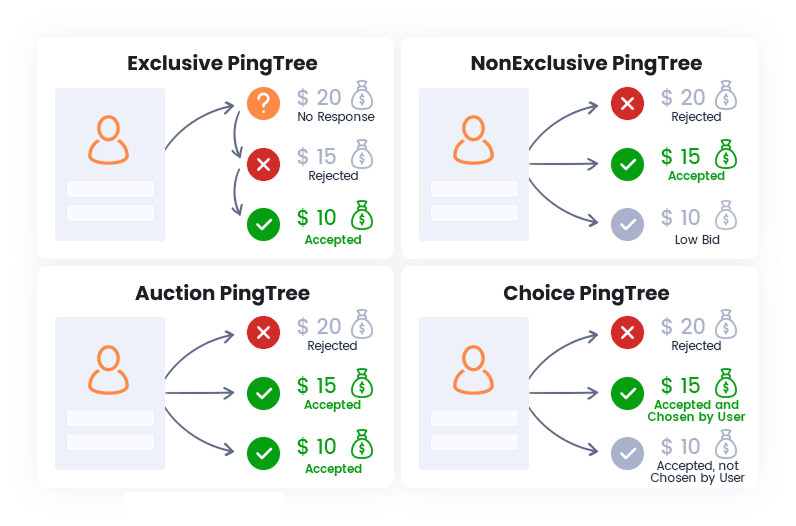
Exclusive follows the order you set, so put the channel you expect to earn most at the top. That is usually not the highest raw commission but the highest expected value, which is the commission multiplied by how often that advertiser actually accepts.
Redirect Types
The Redirect Type defines what happens to the customer after the channel succeeds:
- Priority – immediately redirects to the first successful channel in the pingtree. Since it always takes the first success, order the channels carefully.
- FinalPage – the channel is displayed on the final page alongside other offers, each with a button leading to the advertiser.
- Visible Only – the channel is displayed on the final page but with a disabled button, so the customer cannot be redirected to it.
- Hidden – the channel is not shown on the final page at all.
A single channel set to Priority overrides everything else. If it succeeds, the Final Page is never displayed and nothing else is shown, however many other channels also succeeded.
Combination of Distribution types
All four logics can be combined within a single pingtree. When they overlap, the system follows these rules:
- Exclusive, Choice and Auction channels are evaluated as grouped blocks, based on their position in the pingtree. Once the system moves to a different type, the previous block is finished. For example, all Auction channels in one block are resolved first, and if no sale occurs, the pingtree continues with the next type.
- Non-Exclusive channels always run simultaneously, either alongside the first Exclusive channel or alongside the next block.
Examples:
- Non-Exclusive before Exclusive – runs in parallel with the first Exclusive. Redirect goes to the first Priority channel or to the Final Page.
- Non-Exclusive before Choice or Auction – runs in parallel with the whole Choice or Auction block. Redirect again goes to the first Priority channel or to the Final Page.
- Non-Exclusive after Exclusive, Choice or Auction – only executed if all previous channels in those blocks were unsuccessful.
What happens to each channel
Every channel in the pingtree ends up with one of four outcomes, and you see them in the Pingtree report:
- ok – the advertiser accepted the lead.
- fail – the advertiser did not accept it, or the integration could not complete.
- processing – the channel is being worked on right now.
- waiting – the channel has paused and expects something to arrive, typically a webhook from the advertiser.
A pingtree that leaves channels in waiting for a long time is worth looking at. The customer is not waiting with them, so a late answer arrives after they have gone.
Where the Customer is actually Redirected
When a lead is created, either through an iframe form or through the API, PalDock immediately generates a process URL for that lead:
https://portal.paldock.com/{tenant}/processes/{process_id}This always exists, whatever the pingtree does. For iframe forms the customer goes there immediately. For API leads it comes back as url in the response and the affiliate must send the customer there. See API integration.
The process URL is always opened as a full page on your own domain, never inside the affiliate’s iframe. That is deliberate: a full page means first-party cookies and a clean full-screen experience, while an iframe would depend on third-party cookies and be visually limited. You can replace the PalDock domain with a custom domain of your own.
The customer first sees a loader screen, then a sequence of internal screens such as verification, thank-you page and final page, depending on how the lead is processed. Admins design these in Design and arrange them into funnels in Funnel.
Where each channel sends the customer
That is a different URL, one per channel, and it comes from the advertiser rather than from PalDock.
In the channel’s integration, the HTTP node’s response mapping stores the advertiser’s destination in redirect_url. That is the address behind the button on the Final Page, and the target of a Priority redirect. A channel that accepts the lead but returns no redirect_url has nowhere to send the customer.
Visualisation
Example, a Final Page with four successful channels:
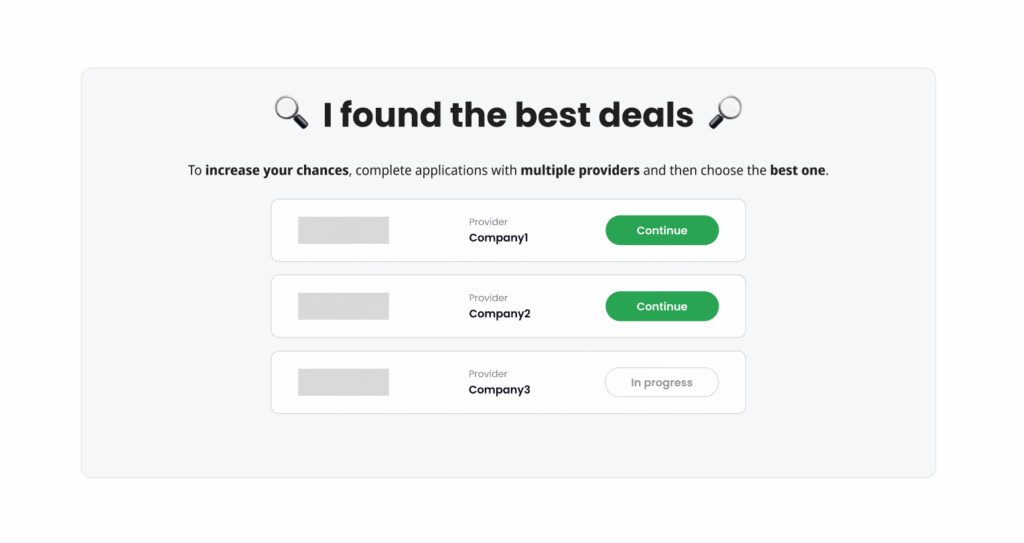
- Company4, Redirect Hidden, so it is not visible.
- Company3, Redirect Visible Only.
- Company1 and Company2, Redirect FinalPage.
If any of these channels had Priority, the Final Page would not be displayed at all and the customer would be redirected immediately.
When a channel is deleted or moved
Channels are soft deleted, which means a deleted channel is still visible and still works on Final Pages created before it was removed.
This is deliberate. The channel was active at the moment the lead was created, so it was part of that lead’s flow. If capping deactivates a channel, leads that already went through it keep it.
- A deleted channel is still visible on older Final Pages.
- Its link still works for historical leads.
- Deletion or deactivation affects future leads only.
There is no full delete, so a channel never disappears from Final Pages that already exist.
The same applies to moving a channel. It can be dragged to the end of the pingtree, or from a Non-Exclusive block into a Choice block, and older Final Pages keep the original arrangement, because that was the valid configuration when those leads were created.




