| Advertiser | Chytrá Autozástava |
| Country | CZ |
| Segment | Finance |
| Product | Loan |
| Integration type | Lead generation |
| Flows | → Post |
Use global fields and skip mapping entirely
Every prebuilt integration is already mapped to PalDock’s global fields. Populate them once in your lead structure, whether leads arrive through the API or form, and the same fields feed every integration you run.
Integration overview
This prebuilt PalDock integration connects your lead flow directly to the advertiser. It handles field mapping, request delivery and response processing, so you can start sending leads without building the integration from scratch.
The integration uses PalDock’s global fields and returns standardized outcomes for reporting and routing, while preserving advertiser response details for troubleshooting.
Blueprint
{
"nodes": [
{
"id": "1-1",
"type": "startNode",
"position": {
"x": -620,
"y": 180
},
"data": {
"formData": {
"active": true,
"title": "",
"subtitle": "",
"flow": "post",
"beType": "integration"
}
}
},
{
"id": "1-2",
"type": "httpNode",
"position": {
"x": -380,
"y": 140
},
"data": {
"formData": {
"active": true,
"title": "Post",
"subtitle": "",
"method": "POST",
"endpoint": "{endpoint}/api/partners/leads",
"timeout": 40,
"format": "application/json",
"parser": "json",
"notsend": null,
"convert_data": null,
"headers": [
{
"key": "Accept",
"value": "application/json"
},
{
"key": "X-Nonce",
"value": "{random_sign}"
},
{
"key": "X-Api-Key",
"value": "{token}"
},
{
"key": "X-Signature",
"value": "{signature}"
},
{
"key": "X-Timestamp",
"value": "{timestamp_sign}"
},
{
"key": "Content-Type",
"value": "application/json"
}
],
"query": [],
"body": [
{
"key": "email",
"value": "{data_email}"
},
{
"key": "phone",
"value": "{data_cell_phone}"
},
{
"key": "last_name",
"value": "{data_last_name}"
},
{
"key": "first_name",
"value": "{data_first_name}"
},
{
"key": "gdpr_consent",
"value": "toBool(true)"
},
{
"key": "partner_lead_id",
"value": "{eid}"
}
],
"signature": {
"type": "hmac_timestamp_json",
"sha": "256",
"delimiter": "."
},
"insecure": null
}
}
},
{
"id": "1-5",
"type": "setNode",
"position": {
"x": 40,
"y": 100
},
"data": {
"formData": {
"active": true,
"title": "Store response",
"subtitle": "",
"fields": [
{
"key": "{external_id}",
"value": "{parsedBody.lead_public_id}"
}
]
}
}
},
{
"id": "1-8",
"type": "endNode",
"position": {
"x": 280,
"y": 100
},
"data": {
"formData": {
"active": true,
"title": "Success",
"subtitle": "",
"success": "success"
}
}
},
{
"id": "1-6",
"type": "modifyFieldNode",
"position": {
"x": 40,
"y": 280
},
"data": {
"formData": {
"active": true,
"title": "Reject reason · Post",
"subtitle": "",
"data": [
{
"fieldName": "{reason}",
"fields": [
{
"source": "{parsedBody.result}",
"operator": "always",
"value": "",
"value2": "",
"modification": "replace",
"pattern": "",
"output": "Unspecified"
},
{
"source": "{parsedBody.result}",
"operator": "equals",
"value": "duplicate_flagged",
"value2": "",
"modification": "replace",
"pattern": "",
"output": "Duplicate"
},
{
"source": "{parsedBody.result}",
"operator": "equals",
"value": "rejected_validation",
"value2": "",
"modification": "replace",
"pattern": "",
"output": "Invalid Data"
},
{
"source": "{parsedBody.result}",
"operator": "equals",
"value": "rejected_signature",
"value2": "",
"modification": "replace",
"pattern": "",
"output": "ERROR"
},
{
"source": "{parsedBody.result}",
"operator": "equals",
"value": "rejected_rate_limit",
"value2": "",
"modification": "replace",
"pattern": "",
"output": "ERROR"
},
{
"source": "{status}",
"operator": "regex_match",
"value": "^(401|403)$",
"value2": "",
"modification": "replace",
"pattern": "",
"output": "ERROR"
}
]
},
{
"fieldName": "{reason_detail}",
"fields": [
{
"source": "{status}",
"operator": "always",
"value": "",
"value2": "",
"modification": "replace",
"pattern": "",
"output": "http {status}: {parsedBody.result}"
},
{
"source": "{parsedBody.error}",
"operator": "is_not_empty",
"value": "",
"value2": "",
"modification": "replace",
"pattern": "",
"output": "http {status}: {parsedBody.error}"
},
{
"source": "{parsedBody.result}",
"operator": "equals",
"value": "duplicate_flagged",
"value2": "",
"modification": "replace",
"pattern": "",
"output": "duplicate_flagged, {parsedBody.lead_public_id}"
}
]
}
]
}
}
},
{
"id": "1-7",
"type": "endNode",
"position": {
"x": 280,
"y": 340
},
"data": {
"formData": {
"active": true,
"title": "Rejected",
"subtitle": "",
"success": "failed"
}
}
},
{
"id": "1-3",
"type": "modifyFieldNode",
"position": {
"x": -380,
"y": 380
},
"data": {
"formData": {
"active": true,
"title": "Reject reason · Product mismatch",
"subtitle": "",
"data": [
{
"fieldName": "{reason}",
"fields": [
{
"source": "{data_own_car}",
"operator": "always",
"value": "",
"value2": "",
"modification": "replace",
"pattern": "",
"output": "Product Mismatch"
}
]
},
{
"fieldName": "{reason_detail}",
"fields": [
{
"source": "{data_own_car}",
"operator": "always",
"value": "",
"value2": "",
"modification": "replace",
"pattern": "",
"output": "own_car={data_own_car}, amount={data_requested_amount}"
}
]
}
]
}
}
},
{
"id": "1-4",
"type": "modifyFieldNode",
"position": {
"x": -540.7989821883,
"y": 469.69211195929
},
"data": {
"formData": {
"active": true,
"title": "Reject reason · Product mismatch",
"subtitle": "",
"data": [
{
"fieldName": "{reason}",
"fields": [
{
"source": "{data_own_car}",
"operator": "always",
"value": "",
"value2": "",
"modification": "replace",
"pattern": "",
"output": "Product Mismatch"
}
]
},
{
"fieldName": "{reason_detail}",
"fields": [
{
"source": "{data_own_car}",
"operator": "always",
"value": "",
"value2": "",
"modification": "replace",
"pattern": "",
"output": "own_car={data_own_car}, amount={data_requested_amount}"
}
]
}
]
}
}
}
],
"edges": [
{
"id": "edge-1-1-1-2",
"source": "1-1",
"target": "1-2",
"type": "customEdge",
"data": {
"active": true,
"title": "own car + amount",
"subtitle": "",
"conditions": [
{
"value": "{data_own_car}",
"operator": "regex_not_match",
"output": "^(0|no|null)$",
"output2": ""
},
{
"value": "{data_own_car}",
"operator": "is_not_empty",
"output": "",
"output2": ""
},
{
"value": "{data_requested_amount}",
"operator": "is_greater_than",
"output": "29999",
"output2": ""
}
]
}
},
{
"id": "edge-1-1-1-3",
"source": "1-1",
"target": "1-3",
"type": "customEdge",
"data": {
"active": true,
"title": "no car",
"subtitle": "",
"conditions": [
{
"value": "{data_own_car}",
"operator": "regex_match",
"output": "^(0|no|null|)$",
"output2": ""
}
]
}
},
{
"id": "edge-1-1-1-4",
"source": "1-1",
"target": "1-4",
"type": "customEdge",
"data": {
"active": true,
"title": "",
"subtitle": "",
"conditions": [
{
"value": "{data_own_car}",
"operator": "regex_not_match",
"output": "^(0|no|null)$",
"output2": ""
},
{
"value": "{data_requested_amount}",
"operator": "is_less_than",
"output": "29999",
"output2": ""
}
]
}
},
{
"id": "edge-1-2-1-5",
"source": "1-2",
"target": "1-5",
"type": "customEdge",
"data": {
"active": true,
"title": "accepted",
"subtitle": "",
"conditions": [
{
"value": "{status}",
"operator": "equals",
"output": "201",
"output2": ""
},
{
"value": "{parsedBody.result}",
"operator": "equals",
"output": "accepted",
"output2": ""
}
]
}
},
{
"id": "edge-1-2-1-6",
"source": "1-2",
"target": "1-6",
"type": "customEdge",
"data": {
"active": true,
"title": "not accepted",
"subtitle": "",
"conditions": [
{
"value": "{parsedBody.result}",
"operator": "regex_not_match",
"output": "^accepted$",
"output2": ""
}
]
}
},
{
"id": "edge-1-5-1-8",
"source": "1-5",
"target": "1-8",
"type": "customEdge",
"data": {
"active": true,
"title": "",
"subtitle": "",
"conditions": []
}
},
{
"id": "edge-1-6-1-7",
"source": "1-6",
"target": "1-7",
"type": "customEdge",
"data": {
"active": true,
"title": "",
"subtitle": "",
"conditions": []
}
},
{
"id": "edge-1-3-1-7",
"source": "1-3",
"target": "1-7",
"type": "customEdge",
"data": {
"active": true,
"title": "",
"subtitle": "",
"conditions": []
}
},
{
"id": "edge-1-4-1-7",
"source": "1-4",
"target": "1-7",
"type": "customEdge",
"data": {
"active": true,
"title": "",
"subtitle": "",
"conditions": []
}
}
]
}How it works
- Copy the blueprint and paste it in your PalDock workspace– Create a new integration in your workspace and paste the blueprint. Every field arrives prefilled.
- Enter your credentials – Paste the secrets you received from advertiser and set your Pingtree
- Send a test lead – Verify the response, then switch the channel live.
FAQ
Do I need my own contract with this advertiser?
Yes. PalDock delivers leads on your behalf, so the commercial agreement and API credentials come from the advertiser directly.
What happens to rejected leads?
The advertiser returns its decision in the delivery response. PalDock reads it and moves rejected leads to the next buyer in your pingtree automatically, so a rejection does not need to end the lead’s journey.
Can I change the field mapping?
Yes, but we do not recommend it. Blueprints are already mapped to PalDock’s global fields. If you use local fields, you need to remap each integration separately.
How long does setup take?
Few clicks, if you already have credentials. The blueprint arrives prefilled and mapped to PalDock’s global fields, so if your lead structure uses them, there is nothing to map. If you use local fields, you map them once.
What the integration does
Start sending leads in 3 clicks
Copy the prebuilt blueprint, add your credentials and start sending leads. No coding, no integration work.
Real-time lead delivery
Send leads to the advertiser instantly as they arrive, without exports, batches or manual processing.
No field mapping headache
PalDock global fields work across all prebuilt integrations. Map your lead data once and reuse it everywhere.
Know exactly why leads fail
Get standardized rejection reasons for reporting and advertiser’s response for the full context and troubleshooting.
API & integration details
Loans secured against a vehicle. One call, a signed request, and a result field that says what happened.
The product only fits someone who owns a car and wants a substantial amount. Filtering for that before the request is worth doing: it turns leads the advertiser would refuse into a Product Mismatch you can name yourself, and it keeps the rejection reports about the advertiser’s decisions rather than about your traffic.
What will be needed from advertiser
| Key | Purpose |
|---|---|
endpoint | Base API URL. |
token | API key sent in X-Api-Key. |
sign_secret | Shared HMAC signing secret. |
Flows
Post, POST /api/partners/leads. Creates the lead.
Calls
POST {endpoint}/api/partners/leads
X-Api-Key: {token}
X-Timestamp: {timestamp_sign}
X-Signature: {signature}
X-Nonce: {random_sign}
Accept: application/json
Content-Type: application/json
format: application/json
The API key has the form chzp_… and goes in X-Api-Key.
Signing is optional per source but usually on. The signature is HMAC-SHA256("<X-Timestamp>.<raw body>") in hex, keyed with the shared secret. In PalDock this is the hmac_timestamp_json algorithm with SHA-256 and . as the delimiter; the node fills {signature}, {timestamp_sign} and {random_sign} itself.
The secret is never sent. It lives in sign_secret and only the digest derived from it travels. The timestamp has to be within five minutes of the advertiser’s clock.
The advertiser may also restrict access by IP address and apply a per-minute request limit.
Request fields
| Field | Required | Value |
|---|---|---|
email | conditionally | {g_email}, required unless phone is sent |
phone | conditionally | {g_phone}, required unless email is sent |
first_name | no | {g_name_first} |
last_name | no | {g_name_last} |
partner_lead_id | no in name only | {send_id} |
gdpr_consent | no | toBool({g_consent_processing}) |
marketing_consent | no | toBool({g_consent_marketing}) |
loan_amount | no | {g_amount} |
loan_urgency | no | {g_period} or free text |
vehicle.brand | no | {g_asset_type} |
vehicle.model | no | {g_asset_variant} |
vehicle.year | no | {g_asset_year}, 1980 to 2099 |
vehicle.mileage_km | no | {g_asset_usage} |
source_campaign, ad, ad_set_name, platform, form_name | no | tracking parameters |
note | no | {g_notes} |
Send partner_lead_id even though it is formally optional. Without it there is nothing to match the postback against, and the conversion cannot be reconciled.
Vehicle fields may be sent nested under vehicle or flat at the top level; both are accepted. Unknown parameters are ignored.
loan_amount is free text rather than a number, so a range is acceptable.
Enums
None.
Outcomes
| Recognised by | HTTP | Meaning | Reject reason | Frequency |
|---|---|---|---|---|
result: accepted | 201 | Accepted | , | common |
result: duplicate_flagged | 200 | Already seen | Duplicate | occasional |
result: rejected_validation | 200 | Payload refused | Invalid Data | occasional |
result: rejected_signature | 401 | Bad or missing signature | , (technical) | rare |
result: rejected_validation | 401 | Missing or invalid API key | , (technical) | rare |
result: rejected_validation | 403 | IP address not allowed | , (technical) | rare |
result: rejected_rate_limit | 429 | Too many requests | , (technical) | rare |
The last four are not rejections of the lead. They mean the integration is misconfigured or throttled, and mapping them to a reject reason hides a fault behind a normal-looking report line. Leave them uncovered: PalDock records HTTP 401, HTTP 403 and HTTP 429 on its own, and a block of those in the report is unmistakable.
duplicate_flagged still returns a lead_public_id, which is worth carrying into {reason_detail} so the earlier lead can be found.
Reject reasons come from the standard list. See Reject reason for what each one means and when to use it.
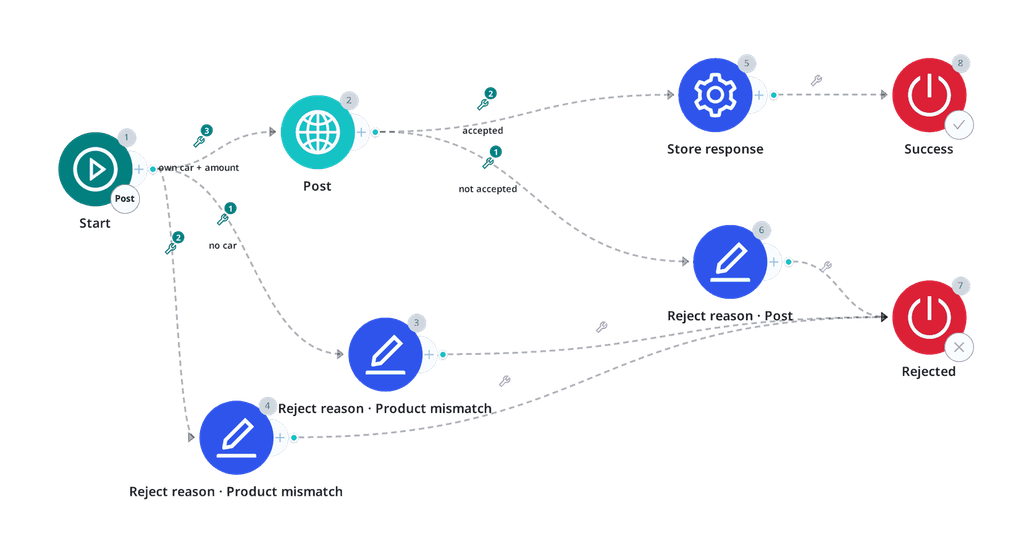
Branching
Accepted:
{status}                  equals            201
{parsedBody.result}       equals            accepted
Refused, scoped to the business field, so only the advertiser’s own answers arrive here:
{parsedBody.result} regex not match ^accepted$Optionally, filter before the request:
own vehicle    regex not match   ^(0|no|null|)$
{g_amount}     is greater than   29999
Each filtered path ends in a Reject reason node mapping Product Mismatch, with the values that failed carried into {reason_detail}.
Stored values
| Parameter | Source |
|---|---|
{external_id} | {parsedBody.lead_public_id} |
Advertiser APIs change without warning
When they do, leads stop being delivered, often before anyone notices. PalDock gives you delivery logs and alerts so you can catch it early. With Managed Integrations, we watch the connection and fix it for you.