| Advertiser | VistaCredit |
| Country | CZ |
| Segment | Finance |
| Product | Loan |
| Integration type | Lead generation |
| Flows | Ping → Post |
Use global fields and skip mapping entirely
Every prebuilt integration is already mapped to PalDock’s global fields. Populate them once in your lead structure, whether leads arrive through the API or form, and the same fields feed every integration you run.
Integration overview
This prebuilt PalDock integration connects your lead flow directly to the advertiser. It handles field mapping, request delivery and response processing, so you can start sending leads without building the integration from scratch.
The integration uses PalDock’s global fields and returns standardized outcomes for reporting and routing, while preserving advertiser response details for troubleshooting.
Blueprint
{
"nodes": [
{
"id": "1-1",
"type": "startNode",
"position": {
"x": -700,
"y": 220
},
"data": {
"formData": {
"active": true,
"title": "",
"subtitle": "",
"flow": "ping",
"beType": "integration"
}
}
},
{
"id": "2-1",
"type": "startNode",
"position": {
"x": -700,
"y": -240
},
"data": {
"formData": {
"active": true,
"title": "",
"subtitle": "",
"flow": "post",
"beType": "integration"
}
}
},
{
"id": "1-2",
"type": "modifyFieldNode",
"position": {
"x": -500,
"y": 220
},
"data": {
"formData": {
"active": true,
"title": "Transform data",
"subtitle": "",
"data": [
{
"fieldName": "{data_requested_amount}",
"fields": [
{
"source": "{data_requested_amount}",
"operator": "is_greater_than",
"value": "7000",
"value2": "",
"modification": "replace",
"pattern": "",
"output": "7000"
}
]
}
]
}
}
},
{
"id": "1-3",
"type": "httpNode",
"position": {
"x": -280,
"y": 220
},
"data": {
"formData": {
"active": true,
"title": "Ping",
"subtitle": "",
"method": "POST",
"endpoint": "{endpoint}/api/leads/",
"timeout": 30,
"format": "application/json",
"parser": "json",
"notsend": null,
"convert_data": null,
"headers": [
{
"key": "Content-Type",
"value": "application/json"
},
{
"key": "Authorization",
"value": "Token {token}"
}
],
"query": [],
"body": [
{
"key": "key",
"value": "{eid}"
},
{
"key": "amount",
"value": "{data_requested_amount}"
},
{
"key": "income",
"value": "{data_monthly_income}"
},
{
"key": "period",
"value": "35"
},
{
"key": "expenses",
"value": "{data_expenses}"
},
{
"key": "last_name",
"value": "{data_last_name}"
},
{
"key": "first_name",
"value": "{data_first_name}"
},
{
"key": "birth_number",
"value": "{data_nin}"
}
],
"signature": null,
"insecure": null
}
}
},
{
"id": "1-4",
"type": "endNode",
"position": {
"x": 59.055744069899,
"y": 113.51669471981
},
"data": {
"formData": {
"active": true,
"title": "Success",
"subtitle": "",
"success": "success"
}
}
},
{
"id": "1-5",
"type": "modifyFieldNode",
"position": {
"x": 28.040888484979,
"y": 255.8140914298
},
"data": {
"formData": {
"active": true,
"title": "Reject reason",
"subtitle": "",
"data": [
{
"fieldName": "{reason}",
"fields": [
{
"source": "{status}",
"operator": "always",
"value": "",
"value2": "",
"modification": "replace",
"pattern": "",
"output": "Unspecified"
},
{
"source": "{parsedBody.amount.0}",
"operator": "regex_match",
"value": "Částka úvěru",
"value2": "",
"modification": "replace",
"pattern": "",
"output": "Product Mismatch"
},
{
"source": "{parsedBody.period.0}",
"operator": "regex_match",
"value": "Doba úvěru",
"value2": "",
"modification": "replace",
"pattern": "",
"output": "Product Mismatch"
},
{
"source": "{parsedBody.non_field_errors.0}",
"operator": "regex_match",
"value": "živnostensk",
"value2": "",
"modification": "replace",
"pattern": "",
"output": "Not Eligible"
},
{
"source": "{parsedBody.non_field_errors.0}",
"operator": "regex_match",
"value": "rejstříku",
"value2": "",
"modification": "replace",
"pattern": "",
"output": "Poor Credit"
},
{
"source": "{parsedBody.non_field_errors.0}",
"operator": "regex_match",
"value": "pracovní dobu",
"value2": "",
"modification": "replace",
"pattern": "",
"output": "Outside Hours"
},
{
"source": "{parsedBody.non_field_errors.0}",
"operator": "regex_match",
"value": "Podezřelá",
"value2": "",
"modification": "replace",
"pattern": "",
"output": "Fraud"
},
{
"source": "{parsedBody.non_field_errors.0}",
"operator": "regex_match",
"value": "černé listině",
"value2": "",
"modification": "replace",
"pattern": "",
"output": "Blacklist"
},
{
"source": "{parsedBody.birth_number.0}",
"operator": "regex_match",
"value": "Věk",
"value2": "",
"modification": "replace",
"pattern": "",
"output": "Age"
},
{
"source": "{parsedBody.non_field_errors.0}",
"operator": "regex_match",
"value": "již existuje",
"value2": "",
"modification": "replace",
"pattern": "",
"output": "Existing Customer"
},
{
"source": "{parsedBody.birth_number.0}",
"operator": "regex_match",
"value": "už evidováno",
"value2": "",
"modification": "replace",
"pattern": "",
"output": "Duplicate"
},
{
"source": "{parsedBody.key.0}",
"operator": "regex_match",
"value": "Duplicit",
"value2": "",
"modification": "replace",
"pattern": "",
"output": "Duplicate"
}
]
},
{
"fieldName": "{reason_detail}",
"fields": [
{
"source": "{body}",
"operator": "always",
"value": "",
"value2": "",
"modification": "replace",
"pattern": "",
"output": "{body}"
}
]
}
]
}
}
},
{
"id": "1-6",
"type": "endNode",
"position": {
"x": 230.5131077459,
"y": 277.92982013277
},
"data": {
"formData": {
"active": true,
"title": "Rejected",
"subtitle": "",
"success": "failed"
}
}
},
{
"id": "2-2",
"type": "httpNode",
"position": {
"x": -460,
"y": -240
},
"data": {
"formData": {
"active": true,
"title": "Post",
"subtitle": "",
"method": "PUT",
"endpoint": "{endpoint}/api/leads/{eid}/",
"timeout": 30,
"format": "application/json",
"parser": "json",
"notsend": null,
"convert_data": null,
"headers": [
{
"key": "Content-Type",
"value": "application/json"
},
{
"key": "Authorization",
"value": "Token {token}"
}
],
"query": [],
"body": [
{
"key": "email",
"value": "{data_email}"
},
{
"key": "phone_number",
"value": "{data_cell_phone}"
}
],
"signature": null,
"insecure": null
}
}
},
{
"id": "2-3",
"type": "setNode",
"position": {
"x": -186.89219012998,
"y": -340.47212796505
},
"data": {
"formData": {
"active": true,
"title": "Store response",
"subtitle": "",
"fields": [
{
"key": "{redirect_url}",
"value": "{parsedBody.login_url}"
},
{
"key": "{external_id}",
"value": "{parsedBody.loans.0.id}"
}
]
}
}
},
{
"id": "2-5",
"type": "endNode",
"position": {
"x": 32.903367445122,
"y": -321.37501781322
},
"data": {
"formData": {
"active": true,
"title": "Success",
"subtitle": "",
"success": "success"
}
}
},
{
"id": "2-4",
"type": "modifyFieldNode",
"position": {
"x": -180,
"y": -180
},
"data": {
"formData": {
"active": true,
"title": "Reject reason",
"subtitle": "",
"data": [
{
"fieldName": "{reason}",
"fields": [
{
"source": "{status}",
"operator": "always",
"value": "",
"value2": "",
"modification": "replace",
"pattern": "",
"output": "Invalid Data"
}
]
},
{
"fieldName": "{reason_detail}",
"fields": [
{
"source": "{body}",
"operator": "is_not_empty",
"value": "",
"value2": "",
"modification": "replace",
"pattern": "",
"output": "http {status}: {body}"
}
]
}
]
}
}
},
{
"id": "2-6",
"type": "endNode",
"position": {
"x": 49,
"y": -168
},
"data": {
"formData": {
"active": true,
"title": "Rejected",
"subtitle": "",
"success": "failed"
}
}
}
],
"edges": [
{
"id": "edge-1-1-1-2",
"source": "1-1",
"target": "1-2",
"type": "customEdge",
"data": {
"active": true,
"title": "",
"subtitle": "",
"conditions": []
}
},
{
"id": "edge-2-1-2-2",
"source": "2-1",
"target": "2-2",
"type": "customEdge",
"data": {
"active": true,
"title": "",
"subtitle": "",
"conditions": []
}
},
{
"id": "edge-1-2-1-3",
"source": "1-2",
"target": "1-3",
"type": "customEdge",
"data": {
"active": true,
"title": "",
"subtitle": "",
"conditions": []
}
},
{
"id": "edge-1-3-1-4",
"source": "1-3",
"target": "1-4",
"type": "customEdge",
"data": {
"active": true,
"title": "",
"subtitle": "",
"conditions": [
{
"value": "{status}",
"operator": "equals",
"output": "201",
"output2": ""
}
]
}
},
{
"id": "edge-1-3-1-5",
"source": "1-3",
"target": "1-5",
"type": "customEdge",
"data": {
"active": true,
"title": "",
"subtitle": "",
"conditions": [
{
"value": "{status}",
"operator": "equals",
"output": "400",
"output2": ""
}
]
}
},
{
"id": "edge-1-5-1-6",
"source": "1-5",
"target": "1-6",
"type": "customEdge",
"data": {
"active": true,
"title": "",
"subtitle": "",
"conditions": []
}
},
{
"id": "edge-2-2-2-3",
"source": "2-2",
"target": "2-3",
"type": "customEdge",
"data": {
"active": true,
"title": "",
"subtitle": "",
"conditions": [
{
"value": "{status}",
"operator": "equals",
"output": "200",
"output2": ""
}
]
}
},
{
"id": "edge-2-2-2-4",
"source": "2-2",
"target": "2-4",
"type": "customEdge",
"data": {
"active": true,
"title": "",
"subtitle": "",
"conditions": [
{
"value": "{status}",
"operator": "equals",
"output": "400",
"output2": ""
}
]
}
},
{
"id": "edge-2-3-2-5",
"source": "2-3",
"target": "2-5",
"type": "customEdge",
"data": {
"active": true,
"title": "",
"subtitle": "",
"conditions": []
}
},
{
"id": "edge-2-4-2-6",
"source": "2-4",
"target": "2-6",
"type": "customEdge",
"data": {
"active": true,
"title": "",
"subtitle": "",
"conditions": []
}
}
]
}How it works
- Copy the blueprint and paste it in your PalDock workspace– Create a new integration in your workspace and paste the blueprint. Every field arrives prefilled.
- Enter your credentials – Paste the secrets you received from advertiser and set your Pingtree
- Send a test lead – Verify the response, then switch the channel live.
FAQ
Do I need my own contract with this advertiser?
Yes. PalDock delivers leads on your behalf, so the commercial agreement and API credentials come from the advertiser directly.
What happens to rejected leads?
The advertiser returns its decision in the delivery response. PalDock reads it and moves rejected leads to the next buyer in your pingtree automatically, so a rejection does not need to end the lead’s journey.
Can I change the field mapping?
Yes, but we do not recommend it. Blueprints are already mapped to PalDock’s global fields. If you use local fields, you need to remap each integration separately.
How long does setup take?
Few clicks, if you already have credentials. The blueprint arrives prefilled and mapped to PalDock’s global fields, so if your lead structure uses them, there is nothing to map. If you use local fields, you map them once.
What the integration does
Start sending leads in 3 clicks
Copy the prebuilt blueprint, add your credentials and start sending leads. No coding, no integration work.
Real-time lead delivery
Send leads to the advertiser instantly as they arrive, without exports, batches or manual processing.
No field mapping headache
PalDock global fields work across all prebuilt integrations. Map your lead data once and reuse it everywhere.
Know exactly why leads fail
Get standardized rejection reasons for reporting and advertiser’s response for the full context and troubleshooting.
API & integration details
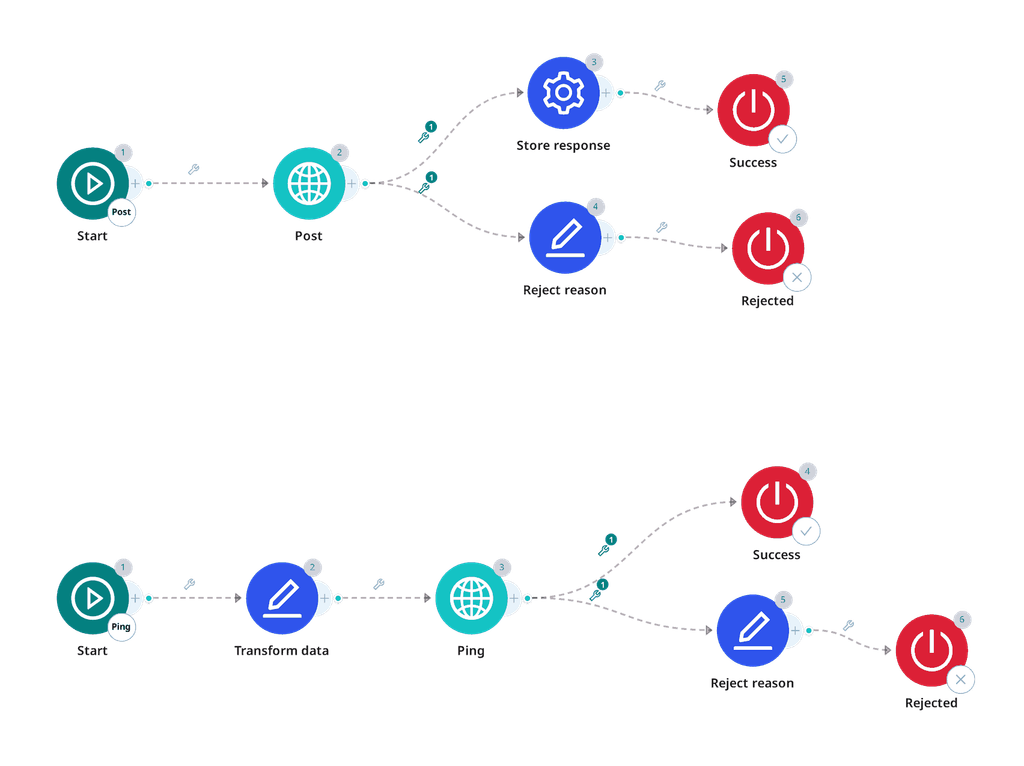
The ping creates a lead record and returns the advertiser’s decision immediately approval or a stated reason. Nothing is billable at that point. The post attaches the contact details to the approved lead, which is what converts it into a customer and returns the URL the applicant is sent to. Between the two, the lead is identified by a key that you choose and send yourself.
Almost all rejections happen at the ping. Expect the large majority of leads to be turned down there, most often for a missing trade licence. Rejections carry a readable Czech sentence, so the reject reason mapping is worth doing properly.
What will be needed from advertiser
| Key | Purpose |
|---|---|
endpoint | Base API URL. |
token | API token used in Authorization: Token …. |
Flows
Ping, POST /api/leads/. Creates the lead and decides. 201 is approval, 400 is a rejection with a reason. Send key yourself; the same value identifies the lead later.
Post, PUT /api/leads/{key}/. Adds phone and email. This is the step that converts the lead into a customer account and triggers the welcome email, so it must not run for a lead the ping did not approve. Returns login_url.
The post needs nothing from the ping response, it addresses the lead by the same key the ping sent, so the two flows stay independent, as they should.
The advertiser also exposes endpoints for checking a lead’s later state. That belongs to the Tracking API, not to the integration, and is configured separately.
Calls
Ping
POST {endpoint}/api/leads/
Authorization: Token {token}
Content-Type: application/json
format: application/json
Post
PUT {endpoint}/api/leads/{send_id}/
Authorization: Token {token}
Content-Type: application/json
format: application/json
A missing or invalid token returns 401 on every endpoint.
Request fields
Ping
| Field | Type | Required | Value |
|---|---|---|---|
key | string | yes | {send_id} |
first_name | string | yes | {g_name_first} |
last_name | string | yes | {g_name_last} |
birth_number | string | yes | {g_id_national_number} |
amount | number | yes | {g_amount}, capped |
period | number | yes | {g_period} |
income | number | no | {g_fin_income} |
expenses | number | no | {g_fin_expenses} |
loan_payments | number | no | {g_fin_expenses_credit} |
mailing_address.street | string | no | {g_address_contact_street} |
mailing_address.house_number | string | no | {g_address_contact_street_number} |
mailing_address.city | string | no | {g_address_contact_city} |
mailing_address.postal_code | string | no | {g_address_contact_zip} |
key is what ties the two flows together, so it has to be a value you can reproduce in the post. {send_id} is the natural choice. Sending a key that already exists returns a duplicate rejection.
amount is capped at 7000, and anything above is rejected outright. period accepts up to 70 days.
birth_number goes as plain digits, no slash.
On capping the amount
Where a request exceeds the advertiser’s maximum, send the maximum rather than the requested figure, but agree it with them first. Translating a higher request down is right only when they would otherwise reject the lead outright. Where they would have made a smaller offer on their own, send what the applicant actually asked for and let them answer.
This is the one place the general rule bends: amount, term and product are the request itself, so they are normally passed through untouched.
Post
| Field | Type | Required | Value |
|---|---|---|---|
phone_number | string | yes | {g_phone} |
email | string | yes | {g_email} |
callback_url | string | no | Tracking API endpoint, configured separately |
Enums
None. The advertiser takes no coded values, no employment type, no housing status, no bank code. Everything is a name, a number or a date.
Outcomes
loans is empty at the ping and holds one entry after the post: the loan does not exist until the contact details arrive. login_url appears only on the post response.
| Recognised by | HTTP | Meaning | Reject reason | Frequency |
|---|---|---|---|---|
key present, loans: [] | 201 | Approved, proceed to post | , | common |
login_url present | 200 | Converted | , | common |
non_field_errors ~ živnostensk | 400 | No valid or active trade licence | Not Eligible | common |
birth_number ~ Věk žadatele | 400 | Outside the accepted age range | Age | common |
non_field_errors ~ Uživatel již existuje | 400 | Already a customer | Existing Customer | occasional |
birth_number ~ Neplatné rodné číslo | 400 | Malformed national ID | Invalid Data | occasional |
birth_number ~ už evidováno | 400 | This person is already on file | Duplicate | occasional |
non_field_errors ~ černé listině | 400 | On the advertiser’s blocklist | Blacklist | rare |
non_field_errors ~ rejstříku | 400 | Found in a debtor register | Poor Credit | rare |
key ~ Duplicitní hodnota | 400 | The key was used before | Duplicate | documented only |
amount ~ Částka úvěru | 400 | Amount outside the product range | Product Mismatch | documented only |
period ~ Doba úvěru | 400 | Term outside the product range | Product Mismatch | documented only |
non_field_errors ~ pracovní dobu | 400 | Outside the advertiser’s hours | Outside Hours | documented only |
non_field_errors ~ Podezřelá | 400 | Suspicious business or contact address | Fraud | documented only |
any field ~ Toto pole je vyžadováno | 400 | Required field missing | Invalid Data | documented only |
Match a substring, not the whole sentence. The exact wording drifts: the documentation gives Uživatel je na černé listině while the live response appends a source, as in Uživatel je na černé listině (RealMoney). The trade-licence rejection arrives in two wordings, nemá platné and nemá aktivní, which mean the same thing. Matching černé listině and živnostensk covers both.
The rejection body is a map of field name to a list of messages, so a single message is at {parsedBody.non_field_errors.0} or {parsedBody.birth_number.0}. Those elements are strings and can be matched directly. Set {reason_detail} from {body} on one unconditional row, it covers every shape at once.
Rows marked documented only have not been seen in production. Map them anyway; they cost one row each and a Dead End costs a report line.
Reject reasons come from the standard list. See Reject reason for what each one means and when to use it.
Branching
Ping, approved:
{status}              equals          201
{parsedBody.key}      is not empty
Ping, rejected, scoped to the advertiser’s own answer, not to the status code:
{status} equals 400Post, converted:
{status}              equals          200
{parsedBody.login_url} is not empty
Nothing else needs a branch. A 404 returns the advertiser’s marketing page as HTML rather than a business answer, and 401 means the token is wrong, both are technical responses and PalDock reports them on its own.
Stored values
| Parameter | Source | Step |
|---|---|---|
{external_id} | {parsedBody.loans.0.id} | Post |
{redirect_url} | {parsedBody.login_url} | Post |
There is nothing worth storing from the ping. The lead is addressed by the key you sent, and the loan does not exist until the post has run.
Advertiser APIs change without warning
When they do, leads stop being delivered, often before anyone notices. PalDock gives you delivery logs and alerts so you can catch it early. With Managed Integrations, we watch the connection and fix it for you.