Use global fields and skip mapping entirely
Every prebuilt integration is already mapped to PalDock’s global fields. Populate them once in your lead structure, whether leads arrive through the API or form, and the same fields feed every integration you run.
Integration overview
This prebuilt PalDock integration connects your lead flow directly to the advertiser. It handles field mapping, request delivery and response processing, so you can start sending leads without building the integration from scratch.
The integration uses PalDock’s global fields and returns standardized outcomes for reporting and routing, while preserving advertiser response details for troubleshooting.
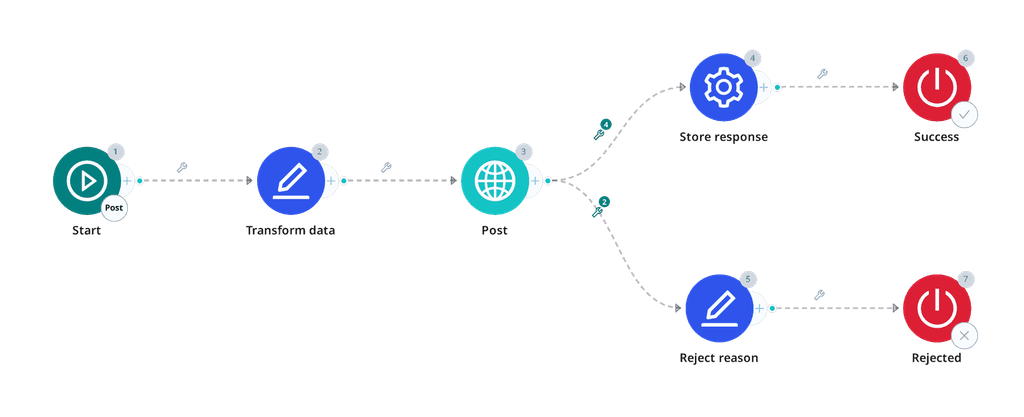
Blueprint
{
"nodes": [
{
"id": "1-1",
"type": "startNode",
"position": {
"x": -700,
"y": 0
},
"data": {
"formData": {
"active": true,
"title": "",
"subtitle": "",
"flow": "post",
"beType": "integration"
}
}
},
{
"id": "1-2",
"type": "modifyFieldNode",
"position": {
"x": -470,
"y": 0
},
"data": {
"formData": {
"active": true,
"title": "Transform data",
"subtitle": "",
"data": [
{
"fieldName": "{data_requested_amount}",
"fields": [
{
"source": "{data_requested_amount}",
"operator": "is_greater_than",
"value": "20000",
"value2": "",
"modification": "replace",
"pattern": "",
"output": "20000"
}
]
},
{
"fieldName": "{data_employed_time}",
"fields": [
{
"source": "{data_employed_time}",
"operator": "equals",
"value": "3-month",
"value2": "",
"modification": "replace",
"pattern": "",
"output": "3"
},
{
"source": "{data_employed_time}",
"operator": "equals",
"value": "1-year",
"value2": "",
"modification": "replace",
"pattern": "",
"output": "10"
},
{
"source": "{data_employed_time}",
"operator": "equals",
"value": "1-2-year",
"value2": "",
"modification": "replace",
"pattern": "",
"output": "24"
},
{
"source": "{data_employed_time}",
"operator": "equals",
"value": "2-5-year",
"value2": "",
"modification": "replace",
"pattern": "",
"output": "48"
},
{
"source": "{data_employed_time}",
"operator": "equals",
"value": "5-year-plus",
"value2": "",
"modification": "replace",
"pattern": "",
"output": "66"
}
]
},
{
"fieldName": "{data_home_status}",
"fields": [
{
"source": "{data_home_status}",
"operator": "equals",
"value": "owner",
"value2": "",
"modification": "replace",
"pattern": "",
"output": "HOME_OWNER"
},
{
"source": "{data_home_status}",
"operator": "equals",
"value": "tenant",
"value2": "",
"modification": "replace",
"pattern": "",
"output": "TENANT"
},
{
"source": "{data_home_status}",
"operator": "equals",
"value": "rent",
"value2": "",
"modification": "replace",
"pattern": "",
"output": "TENANT"
},
{
"source": "{data_home_status}",
"operator": "equals",
"value": "family",
"value2": "",
"modification": "replace",
"pattern": "",
"output": "CO_OWNED"
},
{
"source": "{data_home_status}",
"operator": "equals",
"value": "employ-benefits",
"value2": "",
"modification": "replace",
"pattern": "",
"output": "EMPLOYEE_BENEFIT"
}
]
},
{
"fieldName": "{data_income_type}",
"fields": [
{
"source": "{data_income_type}",
"operator": "equals",
"value": "full-time",
"value2": "",
"modification": "replace",
"pattern": "",
"output": "EMPLOYED"
},
{
"source": "{data_income_type}",
"operator": "equals",
"value": "self-employed",
"value2": "",
"modification": "replace",
"pattern": "",
"output": "SELF_EMPLOYED"
},
{
"source": "{data_income_type}",
"operator": "equals",
"value": "parental",
"value2": "",
"modification": "replace",
"pattern": "",
"output": "MATERNITY_LEAVE"
},
{
"source": "{data_income_type}",
"operator": "equals",
"value": "pension",
"value2": "",
"modification": "replace",
"pattern": "",
"output": "PENSION"
},
{
"source": "{data_income_type}",
"operator": "equals",
"value": "unemployed",
"value2": "",
"modification": "replace",
"pattern": "",
"output": "UNEMPLOYED"
},
{
"source": "{data_income_type}",
"operator": "equals",
"value": "other",
"value2": "",
"modification": "replace",
"pattern": "",
"output": "OTHER"
}
]
},
{
"fieldName": "{data_company_number_imported}",
"fields": [
{
"source": "{data_company_number_imported}",
"operator": "is_empty",
"value": "",
"value2": "",
"modification": "do_not_send",
"pattern": "",
"output": ""
},
{
"source": "{data_company_number_imported}",
"operator": "regex_not_match",
"value": "^\\d{8}$",
"value2": "",
"modification": "do_not_send",
"pattern": "",
"output": ""
}
]
},
{
"fieldName": "{data_contact_city}",
"fields": [
{
"source": "{data_contact_city}",
"operator": "is_empty",
"value": "",
"value2": "",
"modification": "do_not_send",
"pattern": "",
"output": ""
}
]
},
{
"fieldName": "{data_contact_house_number}",
"fields": [
{
"source": "{data_contact_house_number}",
"operator": "is_empty",
"value": "",
"value2": "",
"modification": "do_not_send",
"pattern": "",
"output": ""
}
]
},
{
"fieldName": "{data_contact_street}",
"fields": [
{
"source": "{data_contact_street}",
"operator": "is_empty",
"value": "",
"value2": "",
"modification": "do_not_send",
"pattern": "",
"output": ""
}
]
},
{
"fieldName": "{data_contact_zip}",
"fields": [
{
"source": "{data_contact_zip}",
"operator": "is_empty",
"value": "",
"value2": "",
"modification": "do_not_send",
"pattern": "",
"output": ""
}
]
}
]
}
}
},
{
"id": "1-3",
"type": "httpNode",
"position": {
"x": -220,
"y": 0
},
"data": {
"formData": {
"active": true,
"title": "Post",
"subtitle": "",
"method": "POST",
"endpoint": "{endpoint}/leads/",
"timeout": 30,
"format": "application/json",
"parser": "json",
"notsend": "null",
"convert_data": null,
"headers": [
{
"key": "Content-Type",
"value": "application/json"
},
{
"key": "Authorization",
"value": "Token {token}"
}
],
"query": [],
"body": [
{
"key": "zip",
"value": "{data_zip}"
},
{
"key": "city",
"value": "{data_city}"
},
{
"key": "agree",
"value": "1"
},
{
"key": "email",
"value": "{data_email}"
},
{
"key": "period",
"value": "{data_period}"
},
{
"key": "street",
"value": "{data_street}"
},
{
"key": "country",
"value": "CZ"
},
{
"key": "product",
"value": "payday"
},
{
"key": "employer",
"value": "{data_employer}"
},
{
"key": "expenses",
"value": "{data_expenses}"
},
{
"key": "bank_code",
"value": "{data_bank_code}"
},
{
"key": "job_title",
"value": "{data_job_title}"
},
{
"key": "last_name",
"value": "{data_last_name}"
},
{
"key": "cell_phone",
"value": "{data_cell_phone}"
},
{
"key": "first_name",
"value": "{data_first_name}"
},
{
"key": "ip_address",
"value": "{ip_address}"
},
{
"key": "contact_zip",
"value": "{data_contact_zip}"
},
{
"key": "home_status",
"value": "{data_home_status}"
},
{
"key": "income_type",
"value": "{data_income_type}"
},
{
"key": "birth_number",
"value": "{data_nin}"
},
{
"key": "contact_city",
"value": "{data_contact_city}"
},
{
"key": "house_number",
"value": "{data_house_number}"
},
{
"key": "employed_time",
"value": "{data_employed_time}"
},
{
"key": "account_number",
"value": "{data_account_number}"
},
{
"key": "company_number",
"value": "{data_company_number_imported}"
},
{
"key": "contact_street",
"value": "{data_contact_street}"
},
{
"key": "employer_phone",
"value": "{data_employer_phone}"
},
{
"key": "monthly_income",
"value": "{data_monthly_income}"
},
{
"key": "employer_address",
"value": "{data_employer_address}"
},
{
"key": "requested_amount",
"value": "{data_requested_amount}"
},
{
"key": "remarketing_agree",
"value": "0"
},
{
"key": "third_party_agree",
"value": "0"
},
{
"key": "contact_house_number",
"value": "{data_contact_house_number}"
},
{
"key": "identity_card_number",
"value": "{data_identity_card_number}"
}
],
"signature": null,
"insecure": null
}
}
},
{
"id": "1-4",
"type": "setNode",
"position": {
"x": 40,
"y": -110
},
"data": {
"formData": {
"active": true,
"title": "Store response",
"subtitle": "",
"fields": [
{
"key": "{redirect_url}",
"value": "{parsedBody.redirect_url}"
},
{
"key": "{external_id}",
"value": "{parsedBody.id}"
}
]
}
}
},
{
"id": "1-6",
"type": "endNode",
"position": {
"x": 300,
"y": -110
},
"data": {
"formData": {
"active": true,
"title": "Success",
"subtitle": "",
"success": "success"
}
}
},
{
"id": "1-5",
"type": "modifyFieldNode",
"position": {
"x": 40,
"y": 150
},
"data": {
"formData": {
"active": true,
"title": "Reject reason",
"subtitle": "",
"data": [
{
"fieldName": "{reason}",
"fields": [
{
"source": "{parsedBody.status}",
"operator": "equals",
"value": "FAIL",
"value2": "",
"modification": "replace",
"pattern": "",
"output": "Invalid Data"
},
{
"source": "{parsedBody.errors.period.0}",
"operator": "is_not_empty",
"value": "",
"value2": "",
"modification": "replace",
"pattern": "",
"output": "Product Mismatch"
},
{
"source": "{parsedBody.errors.requested_amount.0}",
"operator": "is_not_empty",
"value": "",
"value2": "",
"modification": "replace",
"pattern": "",
"output": "Product Mismatch"
},
{
"source": "{parsedBody.errors.birth_number.0}",
"operator": "contains",
"value": "Neplatný věk",
"value2": "",
"modification": "replace",
"pattern": "",
"output": "Age"
}
]
},
{
"fieldName": "{reason_detail}",
"fields": [
{
"source": "{body}",
"operator": "always",
"value": "",
"value2": "",
"modification": "replace",
"pattern": "",
"output": "{body}"
}
]
}
]
}
}
},
{
"id": "1-7",
"type": "endNode",
"position": {
"x": 300,
"y": 150
},
"data": {
"formData": {
"active": true,
"title": "Rejected",
"subtitle": "",
"success": "failed"
}
}
}
],
"edges": [
{
"id": "edge-1-1-1-2",
"source": "1-1",
"target": "1-2",
"type": "customEdge",
"data": {
"active": true,
"title": "",
"subtitle": "",
"conditions": []
}
},
{
"id": "edge-1-2-1-3",
"source": "1-2",
"target": "1-3",
"type": "customEdge",
"data": {
"active": true,
"title": "",
"subtitle": "",
"conditions": []
}
},
{
"id": "edge-1-3-1-4",
"source": "1-3",
"target": "1-4",
"type": "customEdge",
"data": {
"active": true,
"title": "",
"subtitle": "",
"conditions": [
{
"value": "{status}",
"operator": "equals",
"output": "201",
"output2": ""
},
{
"value": "{parsedBody.status}",
"operator": "equals",
"output": "OK",
"output2": ""
},
{
"value": "{parsedBody.redirect_url}",
"operator": "is_not_empty",
"output": "",
"output2": ""
},
{
"value": "{parsedBody.id}",
"operator": "is_not_empty",
"output": "",
"output2": ""
}
]
}
},
{
"id": "edge-1-3-1-5",
"source": "1-3",
"target": "1-5",
"type": "customEdge",
"data": {
"active": true,
"title": "",
"subtitle": "",
"conditions": [
{
"value": "{status}",
"operator": "equals",
"output": "400",
"output2": ""
},
{
"value": "{parsedBody.status}",
"operator": "equals",
"output": "FAIL",
"output2": ""
}
]
}
},
{
"id": "edge-1-4-1-6",
"source": "1-4",
"target": "1-6",
"type": "customEdge",
"data": {
"active": true,
"title": "",
"subtitle": "",
"conditions": []
}
},
{
"id": "edge-1-5-1-7",
"source": "1-5",
"target": "1-7",
"type": "customEdge",
"data": {
"active": true,
"title": "",
"subtitle": "",
"conditions": []
}
}
]
}How it works
- Copy the blueprint and paste it in your PalDock workspace– Create a new integration in your workspace and paste the blueprint. Every field arrives prefilled.
- Enter your credentials – Paste the secrets you received from advertiser and set your Pingtree
- Send a test lead – Verify the response, then switch the channel live.
FAQ
Do I need my own contract with this advertiser?
Yes. PalDock delivers leads on your behalf, so the commercial agreement and API credentials come from the advertiser directly.
What happens to rejected leads?
The advertiser returns its decision in the delivery response. PalDock reads it and moves rejected leads to the next buyer in your pingtree automatically, so a rejection does not need to end the lead’s journey.
Can I change the field mapping?
Yes, but we do not recommend it. Blueprints are already mapped to PalDock’s global fields. If you use local fields, you need to remap each integration separately.
How long does setup take?
Few clicks, if you already have credentials. The blueprint arrives prefilled and mapped to PalDock’s global fields, so if your lead structure uses them, there is nothing to map. If you use local fields, you map them once.
What the integration does
Start sending leads in 3 clicks
Copy the prebuilt blueprint, add your credentials and start sending leads. No coding, no integration work.
Real-time lead delivery
Send leads to the advertiser instantly as they arrive, without exports, batches or manual processing.
No field mapping headache
PalDock global fields work across all prebuilt integrations. Map your lead data once and reuse it everywhere.
Know exactly why leads fail
Get standardized rejection reasons for reporting and advertiser’s response for the full context and troubleshooting.
API & integration details
A lead broker rather than a lender. One call, and an unusually clean answer: 201 with a redirect_url when accepted, 400 with a per-field error map when not.
One field dominates this integration and it is not a credit decision. company_number is validated as a Czech IČO, and anything that is not exactly eight digits passing the checksum is refused. Sent unguarded, it accounts for more than half of all rejections.
Drop it rather than repairing it. A value that is empty, or that does not match ^\d{8}$, goes out of the request with do-not-send. Sending a placeholder or a trimmed version turns a missing field into an invalid one, which is worse.
Volsor also asks for exclusivity: a lead they accept is not to be sent anywhere else.
What will be needed from advertiser
| Key | Purpose |
|---|---|
endpoint | Base API URL. |
token | API token used in Authorization: Token …. |
Flows
Post, POST /leads/. Creates the lead and decides.
Calls
POST {endpoint}/leads/
Authorization: Token {token}
Content-Type: application/json
format: application/json
notsend: null
Request fields
| Field | Required | Value |
|---|---|---|
first_name | yes | {g_name_first} |
last_name | yes | {g_name_last} |
birth_number | yes | {g_id_national_number} |
identity_card_number | yes | {g_id_card_number} |
email | yes | {g_email} |
cell_phone | yes | {g_phone} |
street | yes | {g_address_street} |
house_number | yes | {g_address_street_number} |
city | yes | {g_address_city} |
zip | yes | {g_address_zip} |
contact_street | no | {g_address_contact_street} |
contact_house_number | no | {g_address_contact_street_number} |
contact_city | no | {g_address_contact_city} |
contact_zip | no | {g_address_contact_zip} |
home_status | yes | {g_home_type}, see enums |
contact_home_status | no | {g_home_type}, see enums |
income_type | yes | {g_fin_type}, see enums |
monthly_income | yes | {g_fin_income} |
expenses | yes | {g_fin_expenses} |
employer | no | {g_employer_name} |
employer_address | no | {g_employer_address} |
employer_phone | no | {g_employer_phone} |
job_title | no | {g_employ_position} |
employed_time | no | {g_employ_time}, see enums |
company_number | self-employed | {g_company_registration}, exactly eight digits |
account_number | yes | {g_bank_account_number} |
bank_code | yes | {g_bank_account_code}, see enums |
requested_amount | yes | {g_amount}, 500 to 20 000 |
period | yes | {g_period}, 1 to 30 days |
product | yes | payday |
country | yes | CZ |
ip_address | yes | {ip_address} |
agree | yes | 1 |
remarketing_agree | no | {g_consent_marketing} |
third_party_agree | no | 0 |
company_number must be exactly eight digits and pass the Czech IČO checksum. Two do-not-send rows cover it: one on is_empty, one on regex_not_match ^\d{8}$. Without them this is the single largest source of rejections in the whole integration.
bank_code and home_status are closed sets. A value outside them is refused with the value quoted back, so an unmapped bucket shows up plainly in the reject detail.
On capping the amount
Where a request exceeds 20 000, send 20 000 rather than the requested figure, but agree it with them first. Translating a higher request down is right only when they would otherwise reject the lead outright. Where they would have made a smaller offer on their own, send what the applicant actually asked for and let them answer.
Enums
income_type: EMPLOYED, PART_TIME_EMPLOYMENT, SELF_EMPLOYED, PENSION, MATERNITY_LEAVE, BENEFITS, SAVINGS, STUDENT, UNEMPLOYED, OTHER.
home_status: HOME_OWNER, TENANT, DORMITORY, HOSTEL, MINISTRY, EMPLOYEE_BENEFIT, CO_OWNED. Note that rent is not a value; it is TENANT.
employed_time is a number of months: 0, 3 for one to three, 5 for four to seven, 10 for seven to twelve, 24, 36, 48, 60, and 66 for more than five years. Where the form’s bucket falls between two of these, choose the one that presents the lead as qualifying.
bank_code is the Czech bank code, but only from Volsor’s own list. Codes such as 0005 and 0231 are refused.
Outcomes
The rejection body is {"status": "FAIL", "errors": {...}}, where errors is keyed by field name and each value is a list of messages. One response can name several fields at once, so the reject reason should be read from the field that matters most rather than from the first key.
| Recognised by | HTTP | Meaning | Reject reason | Frequency |
|---|---|---|---|---|
status: OK + redirect_url + id | 201 | Accepted | common | |
errors.company_number[] ~ Neplatná hodnota | 400 | Invalid or missing IČO | Invalid Data | common when unguarded |
errors.account_number[] ~ Nesprávné Číslo účtu | 400 | Invalid account number | Invalid Data | occasional |
errors.house_number[] ~ neodpovídá požadovanému formátu | 400 | Malformed house number | Invalid Data | occasional |
errors.zip[] ~ neodpovídá požadovanému formátu | 400 | Malformed postcode | Invalid Data | rare |
errors.cell_phone[] ~ Nesprávný formát | 400 | Malformed phone | Invalid Data | rare |
errors.home_status[] ~ není platnou možností | 400 | Housing value outside the set | Invalid Data | rare |
errors.bank_code[] ~ není platnou možností | 400 | Bank code outside the set | Invalid Data | rare |
errors.birth_number[] ~ Neplatný věk | 400 | Outside the age range | Age | rare |
errors.period[] present | 400 | Term outside 1 to 30 days | Product Mismatch | documented only |
errors.requested_amount[] present | 400 | Amount outside 500 to 20 000 | Product Mismatch | documented only |
| HTML error page | 500 | Advertiser-side failure | rare |
Almost every rejection here is a payload problem rather than a credit decision. That is worth naming: a run of Invalid Data on one field means either the field should be dropped when it cannot be valid, or the form should validate it. Neither is a repair regex in this blueprint.
Reject reasons come from the standard list. See Reject reason for what each one means and when to use it.
Branching
Accepted:
{status}                     equals         201
{parsedBody.status}          equals         OK
{parsedBody.id}              is not empty
{parsedBody.redirect_url}    is not empty
Refused:
{status}                     equals         400
{parsedBody.status}          equals         FAIL
500 returns an HTML page and gets no branch.
Stored values
| Parameter | Source |
|---|---|
{external_id} | {parsedBody.id} |
{redirect_url} | {parsedBody.redirect_url} |
Advertiser APIs change without warning
When they do, leads stop being delivered, often before anyone notices. PalDock gives you delivery logs and alerts so you can catch it early. With Managed Integrations, we watch the connection and fix it for you.