
A Structure scenario runs inside the lead flow itself, while the customer is still filling in the form. It can shape the data, fill in what is missing, or stop the lead before it is finalised.
You find these under Tools / Validation.
There are three purposes. All three are built the same way, with an HTTP node to call the external service, a Set node to store the result, and conditions on the connections to branch on the response. What differs is how they end.
- Validation checks a value against an external service and can reject the lead.
- Modify fills a field with a value pulled from somewhere else.
- Autosuggest offers suggestions while the customer types.
The customer is waiting
Structure scenarios always run instantly. The customer is sitting in front of the form while the flow executes, so the whole thing has to finish inside the synchronous limit, not just one node.
Keep the HTTP timeout short and do not chain lookups you do not need. See Limits and timeouts.
What decides whether the lead is rejected
Not the response. Not the branch. The success setting on the End node.
An End node set to failed rejects the lead. An End node set to success lets it through, whatever the branch was about.
The title of an End node has no effect. You can call it Invalid and still let the lead through, and that is exactly what a Modify scenario does: finding no company number is a valid outcome, it just means the field stays empty. Read the success setting, not the label.
Two rules:
- Only the branch that genuinely means “this value is wrong” should end in failed.
- An outage or an unexpected response must never end in failed. Otherwise every hiccup on the other side starts rejecting real customers.
Validation
Ask an external service whether a value the customer entered is valid, and reject the lead if it is not. Phone numbers are the usual case, since bad numbers are the biggest single source of rejected leads.
The shape:
- Start node, type Structure.
- HTTP node, usually a GET, sending the field value to the validation endpoint, for example
phone={phone}. - Three connections out of the HTTP node, each with its own condition:
- Valid.
{status}equals200and{parsedBody.valid}equalstrue. Ends in success. - Invalid.
{parsedBody.valid}equalsfalse. Ends in failed. This is the only branch that rejects. - Outage.
{status}matches\b[45]\d{2}\b. Ends in success, because a broken service is not a bad lead.
- Valid.
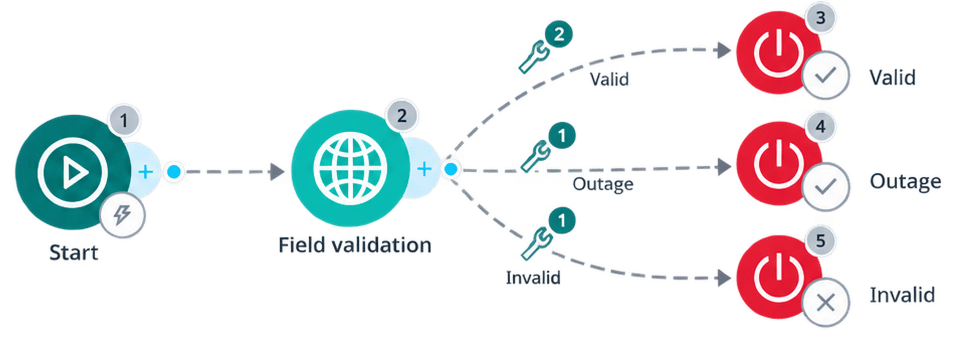
All conditions on one connection must be true for it to be followed. That is why the valid branch checks two things: that the call succeeded and that the service said yes. Checking only the body means an error response with no valid field can slip through.
Match the outage branch with a pattern rather than listing individual status codes. Anything unexpected then lands there instead of falling through somewhere it should not.
Modify
Take something the customer already gave you, look it up externally, and fill a different field with the answer. A company registration number becomes a company name and address.
The shape is the same as validation, with one difference: every branch ends in success.
Enrichment must not reject a lead just because the lookup came back empty. An empty result is an answer, not a failure. Use failed only when a missing value is by itself a genuine reason to turn the lead away.
The shape:
- Start node, type Structure.
- HTTP node calling the lookup endpoint, for example
companyNumber={company_number}. - Three connections:
- Found.
{status}equals200and{parsedBody.name}is not empty. A Set node writes{company_name}={parsedBody.name}, then End, success. - Not found.
{status}equals200and{parsedBody.name}is empty. A Set node with nothing in it, so the field stays blank, then End, success. - Outage. The 4xx or 5xx pattern. End, success.
- Found.
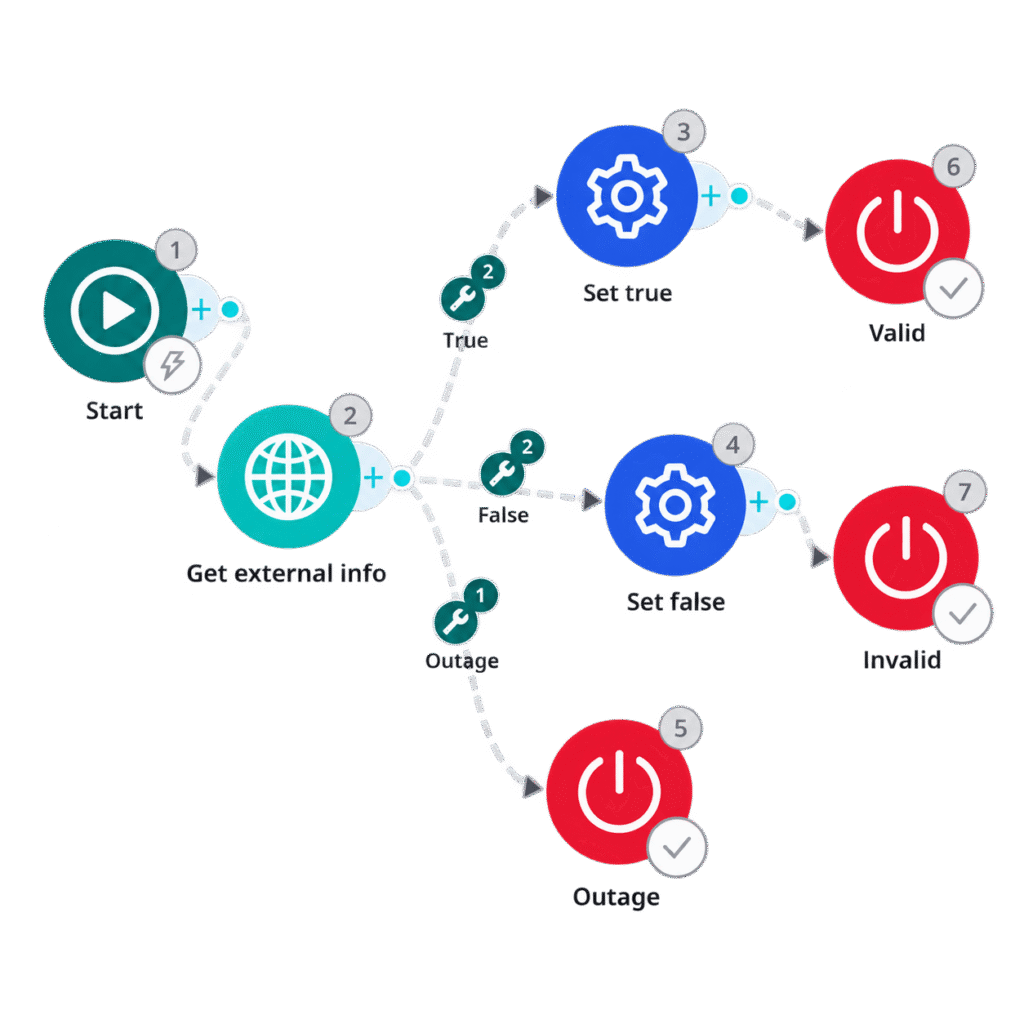
Handle both real outcomes explicitly. Do not leave the negative case to a fallback, because then you cannot tell “we looked and found nothing” apart from “we never got an answer”.
When the API needs something the customer did not give you
Sometimes the lookup needs an input that is not a field on the form. The form collects a full name in one field, and the registry expects a first name and a last name separately.
Add a Modify Field node before the HTTP node. It reads the field you have, transforms it, and writes the result into new fields the request can use.
If you then add a guard on the imported field, such as a do-not-send, be careful with the condition. It has to compare against the live value from the response, written in braces as {parsedBody.name}. Typed without braces it is just a literal string, it can never match, and the guard silently does nothing.
Autosuggest
While the customer types, call a suggestion service and hand back a list for the form to show as a dropdown.
This is the simplest of the three. No branching, no rejection:
- Start node, type Structure.
- HTTP node, usually a POST, sending the partial input, for example
fieldType: COMPANY_NAMEandvalues.COMPANY_NAME: {company_name}. - Set node storing the whole list, for example
{autocomplete_result}={parsedBody.suggestions}. - End node, success.
The form takes it from there: it renders the list and lets the customer pick one.
Because this runs on every keystroke, the timeout matters more here than anywhere else. A slow suggestion service does not just delay the answer, it makes the field feel broken.




