
A Pingtree is a feature that allows you to send a lead to multiple companies at once. Instead of linking one offer to one advertiser, a pingtree lets you group several offers together and decide how they will be distributed. It works on the Ping – Post basis, where you offer the lead (ping) and if the advertiser wants to buy it, then you send it (post).
Think of it as a “smart router” for your traffic – it decides who gets the customer based on the rules you set.
Settings
Each line (channel) in a pingtree can have its own settings:
- Channel Name – Used in reporting and debugging, especially if an advertiser has multiple channels. We recommend using short, self-explanatory names in a structured format, such as channelname_model (e.g., paldock_new_cpl), so you can easily filter later by prefix (company name) or suffix (model type) or middle (channel for new customers).
- Offer – Which offer the channel belongs to.
- Distribution Type – Defines which of the four available distribution logics will be applied to the channel (see below).
- Redirect Type – Whether the customer goes straight to the advertiser’s site, stays on a thank-you page, or sees a list of offers (see below).
- Commission – Shows the current commission settings for the channel and allows you to create a new commission if needed.
- Filter – Conditions that define what data is passed to this channel (e.g., based on country, device, or specific attributes). See the Filters section for more details.
- Channel Status – Active or inactive.
Distribution Types
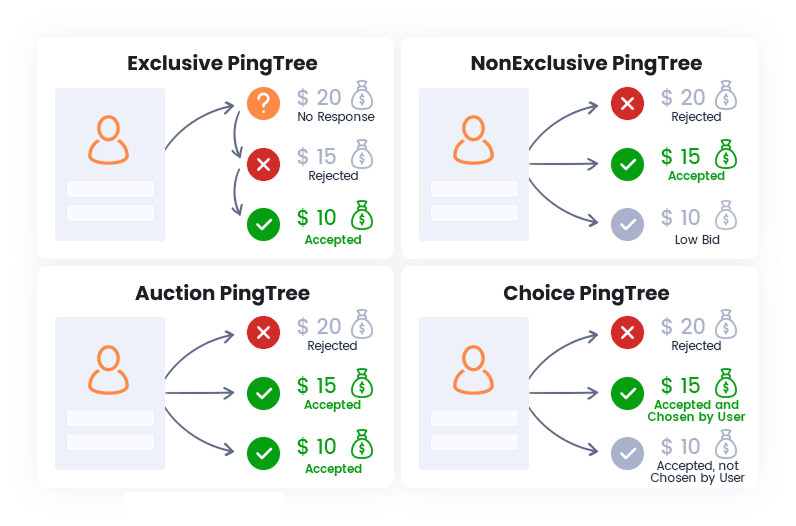
Pingtree works in four types of distribution logic. These can also be combined in flexible ways:
- Exclusive – Customers are sent to one company at a time, usually starting with the channel with best commission. If the company accepts the customer, the sale ends. If not, the customer continues down the line until someone accepts.
- Non-Exclusive – The lead is offered to all companies at the same time, regardless of order in the pingtree . Multiple companies can accept it simultaneously.
- Auction – The customer is offered to all companies (ping), and each returns a price. The customer is sold (post) to the highest bid.
- Choice – The customer is offered to all companies (ping). The customer sees all successful ping channels on Choice Page (ordered by their position in the pingtree ) and selects which one(s) they want to apply to (post). Then they see successful post channels on the FinalPage where they can complete their application (see redirection types). If a channel does not have a Ping method, it is automatically shown in the Choice page.
Redirect Types
You can set the Redirect Type to define how the customer is redirected after submission:
- Priority – Immediately redirects to the first successful channel in the pingtree. Since it always takes the first success, it’s important to order channels in the pingtree carefully.
- Final Page – The channel is displayed on the final page alongside other offers, each with a button leading to the advertiser.
- Hidden – The channel is not shown on the final page.
- Visible Only – The channel is displayed on the final page but with a disabled button, meaning the customer cannot be redirected to it.
Combination of Distribution types
All distribution logics (Non-Exclusive, Exclusive, Auction, and User Choice) can be combined within a single pingtree. When they overlap, the system follows these rules:
- Exclusive, User Choice, and Auction channels are evaluated first as grouped blocks (based on their position in the pingtree). Once the system moves to a different type, the previous block is considered finished. For example, all Auction channels in one block are resolved first; if no sale occurs, the pingtree continues with the next type (e.g., User Choice).
- Non-Exclusive channels always run simultaneously, either alongside the first Exclusive channel or alongside the next distribution block (User Choice/Auction).
Examples:
- Non-Exclusive before Exclusive → Runs in parallel with the first Exclusive. Redirect goes to the first Priority Redirect or to the Final Page.
- Non-Exclusive before User Choice / Auction → Runs in parallel with the entire Choice/Auction block (grouped by position). Redirect again goes to the first Priority Redirect or to the Final Page.
- Non-Exclusive after Exclusive / Choice / Auction → Only executed if all previous channels in those blocks were unsuccessful.
Where the Customer is actually Redirected
When a lead is created (either by filling an iframe form or via API from an affiliate’s site), the system immediately generates a RedirectURL. This is not a fixed link but a dynamic entry point that always exists for each lead and determines what the customer will see next. For iframe forms, the customer is redirected to this RedirectURL immediately. For API leads, the RedirectURL is returned in the API response together with the lead acceptance status, and the affiliate must redirect the customer there.
After submitting the form, the customer first sees a loader screen, followed by a sequence of internal pages (e.g., verification, thank-you page, final page), depending on how the lead is processed. These are called internal screens. In the future, admins will be able to design unlimited internal screens (in Design) and arrange them into funnels (in Funnel). For now, this flow is prepared manually per workspace.
A RedirectURL can be displayed in two ways:
- Embedded in the original iframe (not recommended, as it triggers 3rd-party cookies and is visually limited).
- Full-page redirect on the tenant’s main domain (preferred, as it uses 1st-party cookies and provides a cleaner, full-screen experience).
The actual RedirectURL is configured within each integration in HTTP Request → Reply, where admins map the advertiser’s API response so that its value is stored in the parameter redirect_url, which holds the destination URL for each channel.
Visualisation
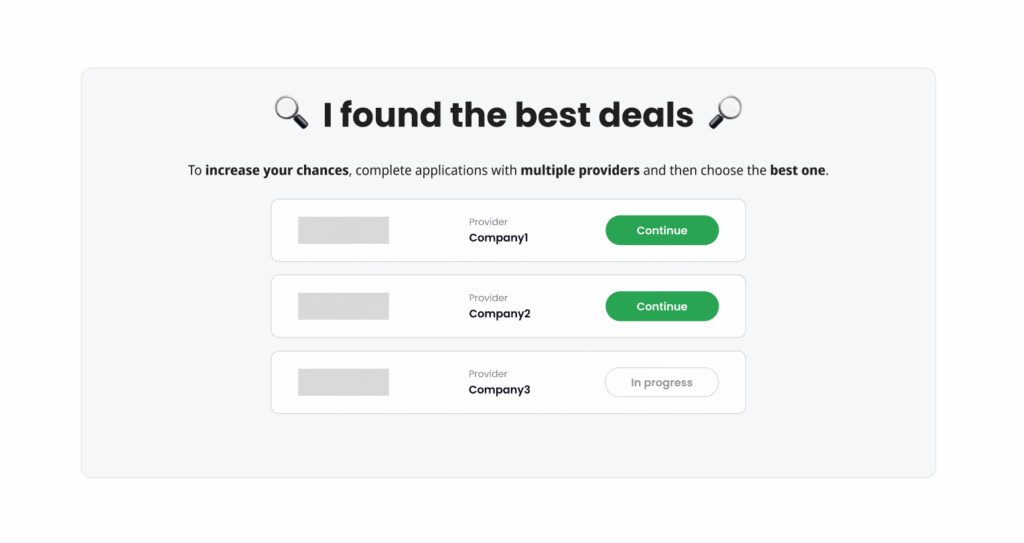
Example – FinalPage with 4 successful channels
- Company4 → Redirect: Hidden (thus is not visible)
- Company3→ Redirect: Visible Only
- Company1, Company2 → Redirect: FinalPage redirect
If any of these channels had Redirect: Priority Redirect, the FinalPage would not be displayed at all and the customer would be redirected immediately.
PingTree behavior when channel is deleted or moved
If a channel is deleted and someone opens an older Final Page a few minutes later, the channel is still visible and clickable on that page. The reason is that the channel was active at the moment the lead was created. It was part of the actual lead flow, so it is correct to keep showing it on older Final Pages even if the channel is later removed or deactivated. For example, if capping is reached and the channel is deactivated, it should still be shown for leads that were already sent through it, because for those leads the channel was valid at that time.
Soft delete
For now, the recommended behavior is effectively a soft delete:
- the channel should still be visible on older Final Pages
- the channel link should still work for historical leads
- deletion or deactivation should only affect future leads, not past ones
We currently do not support Full delete -> that the channel disappears even from historical Final Pages.
Channel position changes
Besides deletion or deactivation, a channel can also be moved to a different place in the pingtree. For example, it may be moved to the end of the routing, or from a non exclusive section into a choice section.
This does not change the main principle. Even if the channel is later moved, older Final Pages should still keep the original channel visible and functional, because that was the valid configuration at the time the lead was created.



